Epson Adjustment Program L3250
Content: Setup_l3250_k_v1.4.exe (1.96 MB)
Uploaded: 26.11.2025
Positive responses: 0
Negative responses: 0
Sold: 0
Refunds: 0
$5.97
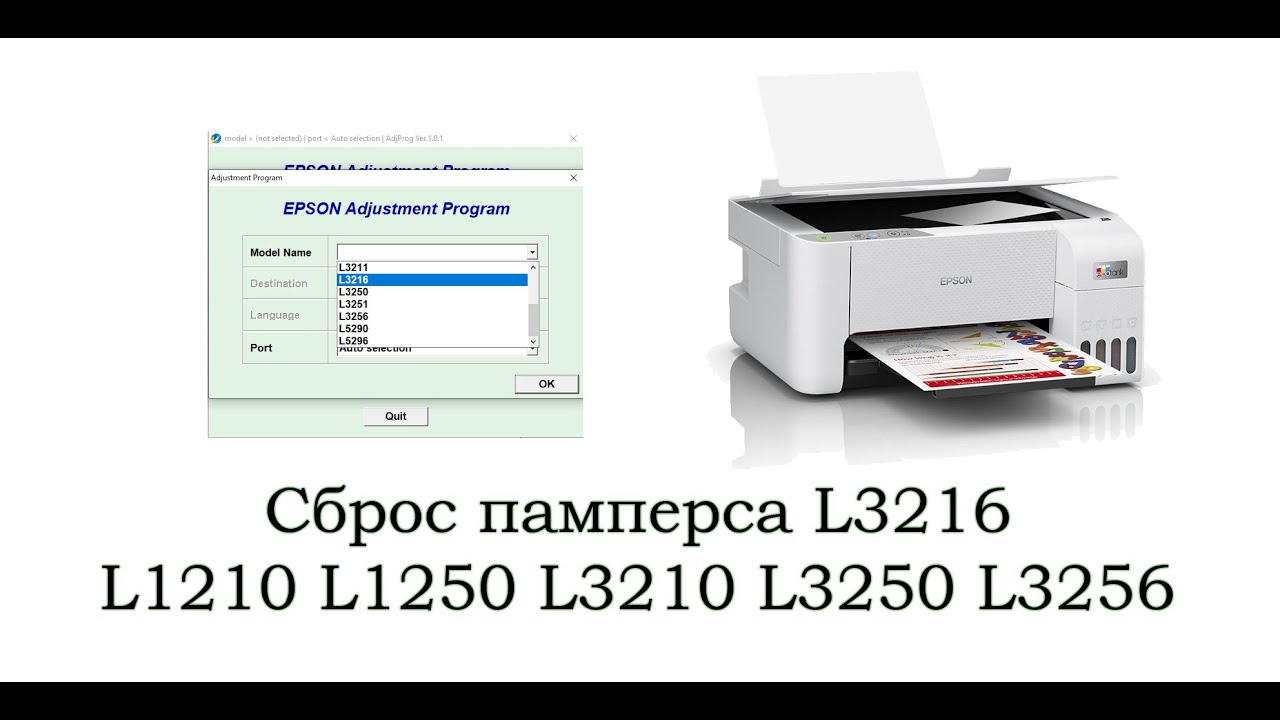
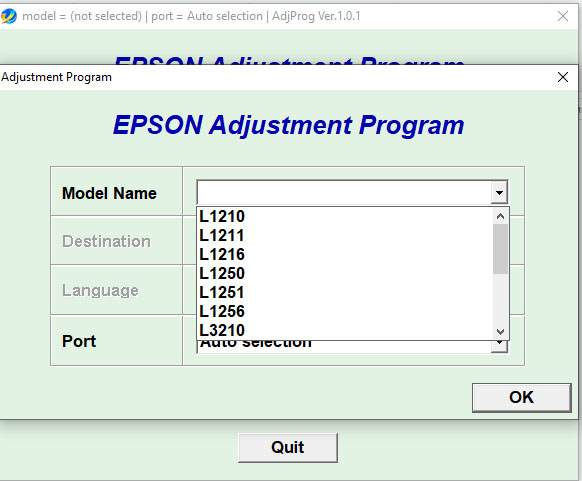
EPSON Adjustment Program is a program for servicing and configuring printers and MFPs from EPSON when the error "Maintenance required. Contact the service center"
Version to reset the diaper overflow error in models:
L1210 L1211 L1216 L1250 L1251 L1256
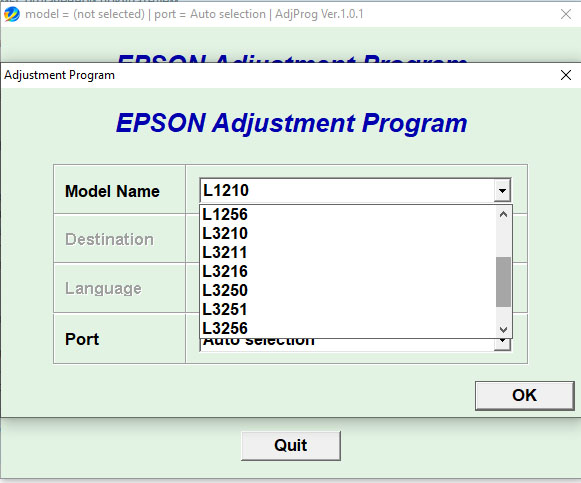
L3200 L3210 L3211 L3216 L3250 L3251 L3256
L5290 L5296
The program can be used an unlimited number of times, you do not need to buy a reset key every time, which significantly saves money.
After payment, the link to the program will be sent to the email address you specified.
If you have any payment issues, please write here https://t.me/epson_pro
If you have any problems, please do not rush to immediately leave a negative review, this will not speed up the solution of the problem.
Any problem can always be solved PEACEFULLY.
If you cannot download the archive after purchase, the program freezes or gives an error, please read these instructions.:
https://epson.exaccess.com/page/faq
If you still cannot clear the error after reading the instructions, BE SURE to write to the order chat.
TECHNICAL SUPPORT OPENING HOURS are from 10:00 to 18:00 on weekdays Moscow time.
❗Support responds only during business hours on a first-come, first-served basis.
Instructions for use in Additional information
Version to reset the diaper overflow error in models:
L1210 L1211 L1216 L1250 L1251 L1256
L3200 L3210 L3211 L3216 L3250 L3251 L3256
L5290 L5296
The program can be used an unlimited number of times, you do not need to buy a reset key every time, which significantly saves money.
After payment, the link to the program will be sent to the email address you specified.
If you have any payment issues, please write here https://t.me/epson_pro
Please read the instructions on the Additional Information tab before purchasing. If you don´t know where the Download folder is on your computer, how to unpack the archive, don´t know how to disable the antivirus, or don´t want to read the instructions, DON´T buy the program!
Contact the specialists who will remotely help you reset the printer error.If you have any problems, please do not rush to immediately leave a negative review, this will not speed up the solution of the problem.
Any problem can always be solved PEACEFULLY.
If you cannot download the archive after purchase, the program freezes or gives an error, please read these instructions.:
https://epson.exaccess.com/page/faq
If you still cannot clear the error after reading the instructions, BE SURE to write to the order chat.
TECHNICAL SUPPORT OPENING HOURS are from 10:00 to 18:00 on weekdays Moscow time.
❗Support responds only during business hours on a first-come, first-served basis.
Instructions for use in Additional information
At the time of payment, you will need to provide your email address. A link to download the program will be sent to your email.
The program only works on the Windows operating system. To unpack the archive, use the WinRAR program.
Instructions for resetting the error.
1. The printer must be connected via a USB cable.
2. The print queue must be cleared.
3. Windows Defender (item "Real-time protection") and other antiviruses should be temporarily disabled.
4. Download the archive (if the browser is blocking the download of the program, search the Internet for instructions on how to bypass the blocking for your browser. Alternatively, use the Edge browser, which does not block the download of the Adjustment Program)
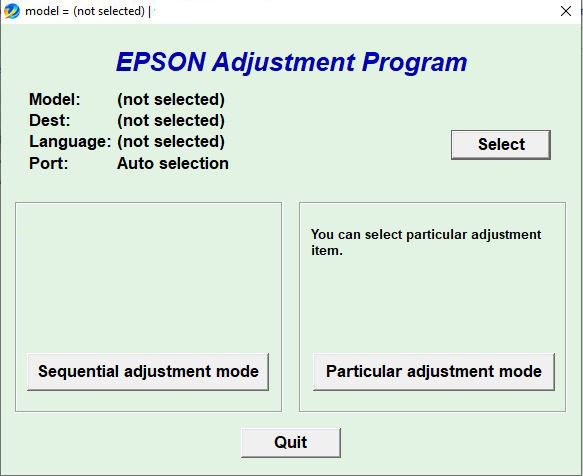
7. Open the file Adjprog.exe
8. In the Select menu, select the desired printer model
9. In the Port field, select the USB Port with the model name of your printer in parentheses and click OK.
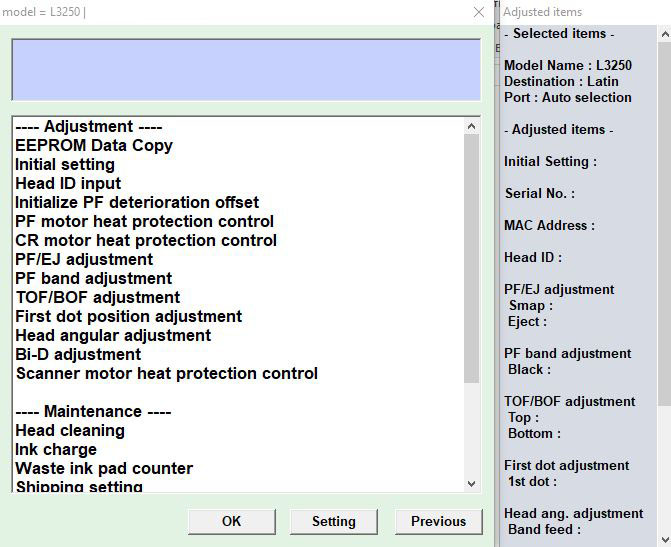
10. The next step is to click on the Particular adjustment mode
11. In the large list of lines we find Waste ink pad counter
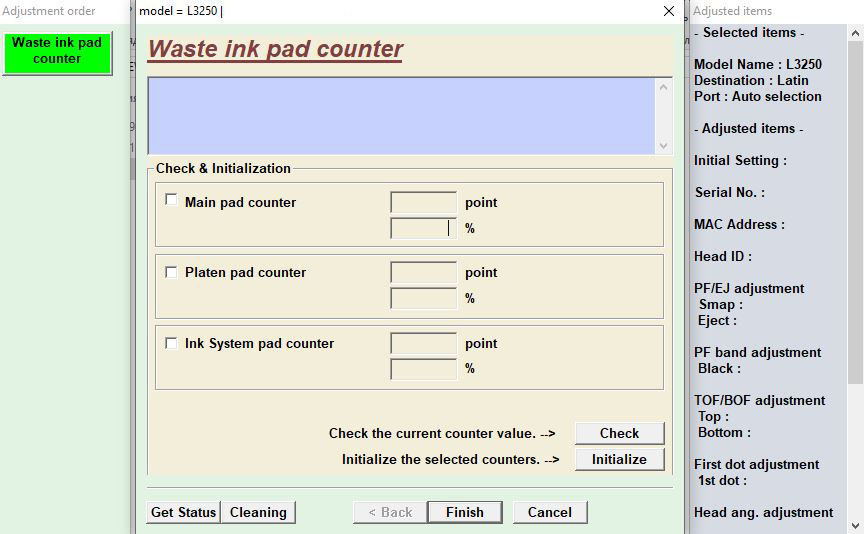
12. In the window that appears, you need to click 3 checkmarks: Main pad counter, Platen pad counter, Ink System Pad counter (in this model there are three diaper counters at once, each of them needs to be reset when overflowing) and click Check
If the program freezes at this stage, check if the print queue is cleared. Remove and re-insert the usb cable into another computer/laptop port. Reinstall the printer driver. If it doesn´t help, try again on another computer/laptop. If you have a service center with dozens/hundreds of previously connected printers, the program probably won´t work for you. Write to us, we will help you with the program.
If everything is in order, a window will appear with the percentage of the counters being filled. One of them should be 100%
13. The numbers with the percentage of occupancy of the counters will appear. One of them should show 100%. It needs to be reset, the other two are optional.
14. Check the box next to the counter with the number 100 and click Initialize. You will be asked to turn off the printer.
15. The last step is to turn off the printer and turn it on again. The device should be ready.attentionIf something didn´t work out for you, please write to us before leaving a review. We will try to respond and help with the reset. We are ready to connect to you and demonstrate the functionality of the program.
The program only works on the Windows operating system. To unpack the archive, use the WinRAR program.
Instructions for resetting the error.
1. The printer must be connected via a USB cable.
2. The print queue must be cleared.
3. Windows Defender (item "Real-time protection") and other antiviruses should be temporarily disabled.
4. Download the archive (if the browser is blocking the download of the program, search the Internet for instructions on how to bypass the blocking for your browser. Alternatively, use the Edge browser, which does not block the download of the Adjustment Program)
7. Open the file Adjprog.exe
8. In the Select menu, select the desired printer model
9. In the Port field, select the USB Port with the model name of your printer in parentheses and click OK.
10. The next step is to click on the Particular adjustment mode
11. In the large list of lines we find Waste ink pad counter
12. In the window that appears, you need to click 3 checkmarks: Main pad counter, Platen pad counter, Ink System Pad counter (in this model there are three diaper counters at once, each of them needs to be reset when overflowing) and click Check
If the program freezes at this stage, check if the print queue is cleared. Remove and re-insert the usb cable into another computer/laptop port. Reinstall the printer driver. If it doesn´t help, try again on another computer/laptop. If you have a service center with dozens/hundreds of previously connected printers, the program probably won´t work for you. Write to us, we will help you with the program.
If everything is in order, a window will appear with the percentage of the counters being filled. One of them should be 100%
13. The numbers with the percentage of occupancy of the counters will appear. One of them should show 100%. It needs to be reset, the other two are optional.
14. Check the box next to the counter with the number 100 and click Initialize. You will be asked to turn off the printer.
15. The last step is to turn off the printer and turn it on again. The device should be ready.attentionIf something didn´t work out for you, please write to us before leaving a review. We will try to respond and help with the reset. We are ready to connect to you and demonstrate the functionality of the program.
No feedback yet