Ashampoo Snap 16 | Perpetual License, Key, and Code. Screen recording, screenshots.
Content: text (0 symbol)
Available: 48
Uploaded: 21.01.2026
Positive responses: 0
Negative responses: 0
Sold: 0
Refunds: 0
$1.79
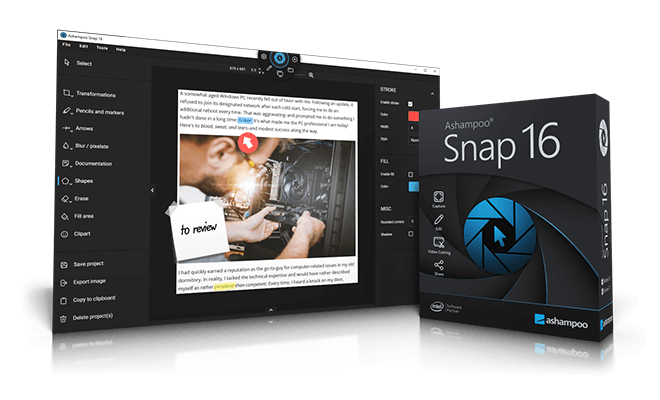
🔥 Buy a license for Ashampoo Snap 16 at a very low price, with a discount.
A powerful tool for taking screenshots and recording videos on Windows. Supports capturing areas, scrolling pages, multi-monitor configurations, annotations, and a built-in video editor.
Ashampoo Snap is a wonderful program for capturing your PC´s screen. This application allows you to capture everything you see on your screen as images or videos and add additional information, such as text or arrows. Capture photos and videos directly from your screen with pixel-perfect accuracy in just a few seconds, and Snap is always the best choice!
⏱️ Instant delivery! ✔️100% Guarantee.
💰 Discount for regular customers! Cashback for positive reviews.
💬 Support in case of problems or questions.
📌 Unique KEY, NOT reusable, can only be activated once.
Activate within 14 days of purchase; no claims will be accepted after that.
Capture and edit any screen content.
Flexibility and precision for your photos.
All the information you need in a single image.
Create your own videos in real time.
Works with any display
Perfect for web content
Video editing for the perfect movie
Securely send or upload to the cloud.
Smart desktop capture and sharing
Once activated, Snap´s magic eye automatically detects elements under the mouse pointer (browser windows, program menus, images, etc.) and offers instant, pixel-perfect capture with a single click. But it doesn´t stop there: Snap can also capture custom rectangular or freeform areas and even supports scrolling content! Naturally, the program supports all possible sharing options, including email and Ashampoo Webspace!
Optical character recognition (OCR) for your screenshots
Snap now recognizes not just 7, but 180 languages! Our new OCR engine uses Windows language packs and delivers better results faster. You likely won´t need all 180 languages at once, so for simplicity, we´ve limited the number of initially available languages to those currently installed on your computer. You can easily add new languages using the "Add language" menu item.
With Ashampoo Snap 16, capturing screenshots and videos is a breeze! Whatever you see on your screen, you can instantly and effortlessly capture. Then you can edit and enhance your shots with graphic elements, automatic numbering, comments, shapes, clip art, and more to tell your story visually and stylishly. The results are easy and instant to share. Whether you´re working from home, need to quickly explain a process, or planning to create an entire tutorial, Snap 16 is your fast track to success!
A state-of-the-art software solution for taking screenshots and capturing videos
A multi-purpose capture tool for rectangular areas, scrolling websites, and more
Share information even faster and save time
Quick screenshots in two clicks
Capture multiple screens in a single screenshot
Optical character recognition (OCR) for your screenshots
Add text and comments
Enliven and clarify details with multiple annotations
Add watermarks
Ashampoo Snap fully supports multi-monitor systems, even those with different resolutions and DPIs, such as Full HD and 4K systems. Each monitor is captured at its own resolution for maximum clarity, and the results can be edited immediately.
A powerful tool for taking screenshots and recording videos on Windows. Supports capturing areas, scrolling pages, multi-monitor configurations, annotations, and a built-in video editor.
A perpetual license for Ashampoo Snap 16 is sold here.
Original. Official.
Global key for any country - key global.
Supported OS: Windows 10/11
My personal keys, NOT for resale, no discounts, no cheaper options available at this time. If you see a cheaper price, consider its origin and the risks.Original. Official.
Global key for any country - key global.
Supported OS: Windows 10/11
Ashampoo Snap is a wonderful program for capturing your PC´s screen. This application allows you to capture everything you see on your screen as images or videos and add additional information, such as text or arrows. Capture photos and videos directly from your screen with pixel-perfect accuracy in just a few seconds, and Snap is always the best choice!
⏱️ Instant delivery! ✔️100% Guarantee.
💰 Discount for regular customers! Cashback for positive reviews.
💬 Support in case of problems or questions.
📌 Unique KEY, NOT reusable, can only be activated once.
Activate within 14 days of purchase; no claims will be accepted after that.
Capture and edit any screen content.
Flexibility and precision for your photos.
All the information you need in a single image.
Create your own videos in real time.
Works with any display
Perfect for web content
Video editing for the perfect movie
Securely send or upload to the cloud.
Smart desktop capture and sharing
Once activated, Snap´s magic eye automatically detects elements under the mouse pointer (browser windows, program menus, images, etc.) and offers instant, pixel-perfect capture with a single click. But it doesn´t stop there: Snap can also capture custom rectangular or freeform areas and even supports scrolling content! Naturally, the program supports all possible sharing options, including email and Ashampoo Webspace!
Optical character recognition (OCR) for your screenshots
Snap now recognizes not just 7, but 180 languages! Our new OCR engine uses Windows language packs and delivers better results faster. You likely won´t need all 180 languages at once, so for simplicity, we´ve limited the number of initially available languages to those currently installed on your computer. You can easily add new languages using the "Add language" menu item.
With Ashampoo Snap 16, capturing screenshots and videos is a breeze! Whatever you see on your screen, you can instantly and effortlessly capture. Then you can edit and enhance your shots with graphic elements, automatic numbering, comments, shapes, clip art, and more to tell your story visually and stylishly. The results are easy and instant to share. Whether you´re working from home, need to quickly explain a process, or planning to create an entire tutorial, Snap 16 is your fast track to success!
A state-of-the-art software solution for taking screenshots and capturing videos
A multi-purpose capture tool for rectangular areas, scrolling websites, and more
Share information even faster and save time
Quick screenshots in two clicks
Capture multiple screens in a single screenshot
Optical character recognition (OCR) for your screenshots
Add text and comments
Enliven and clarify details with multiple annotations
Add watermarks
Ashampoo Snap fully supports multi-monitor systems, even those with different resolutions and DPIs, such as Full HD and 4K systems. Each monitor is captured at its own resolution for maximum clarity, and the results can be edited immediately.
Add to bookmarks and visit our store ➡️ https://www.top.steamkeygift.ru/seller/147467 ✔️
All products are tested, working, guaranteed. We have been working on the site since 2010.
✍🏻Please leave a review, we will be pleased;)
All products are tested, working, guaranteed. We have been working on the site since 2010.
✍🏻Please leave a review, we will be pleased;)
No feedback yet