Ashampoo Photo Converter 3 | Perpetual License, Key. Image Conversion
Content: text (0 symbol)
Available: 55
Uploaded: 21.01.2026
Positive responses: -1
Negative responses: 0
Sold: -1
Refunds: -1
$3.54

🔥 Buy a license for Ashampoo Photo Converter 3 ✔️ at a very low price, with a discount.
A program for fast image conversion and batch processing with command line support. Supports modern formats, effects, RAW files, DPI scaling, and workflow automation.
Image conversion has never been so easy or so powerful.
Two modes: a simple interface for beginners and a powerful command-line interface for professionals and server-based use
64-bit support for optimal memory usage
Modern interface with animated progress bar
Faster PNG and JPG processing (up to 50 times faster)
Extended format support: HEIF, RAW (including Canon, Nikon, DNG), SVG
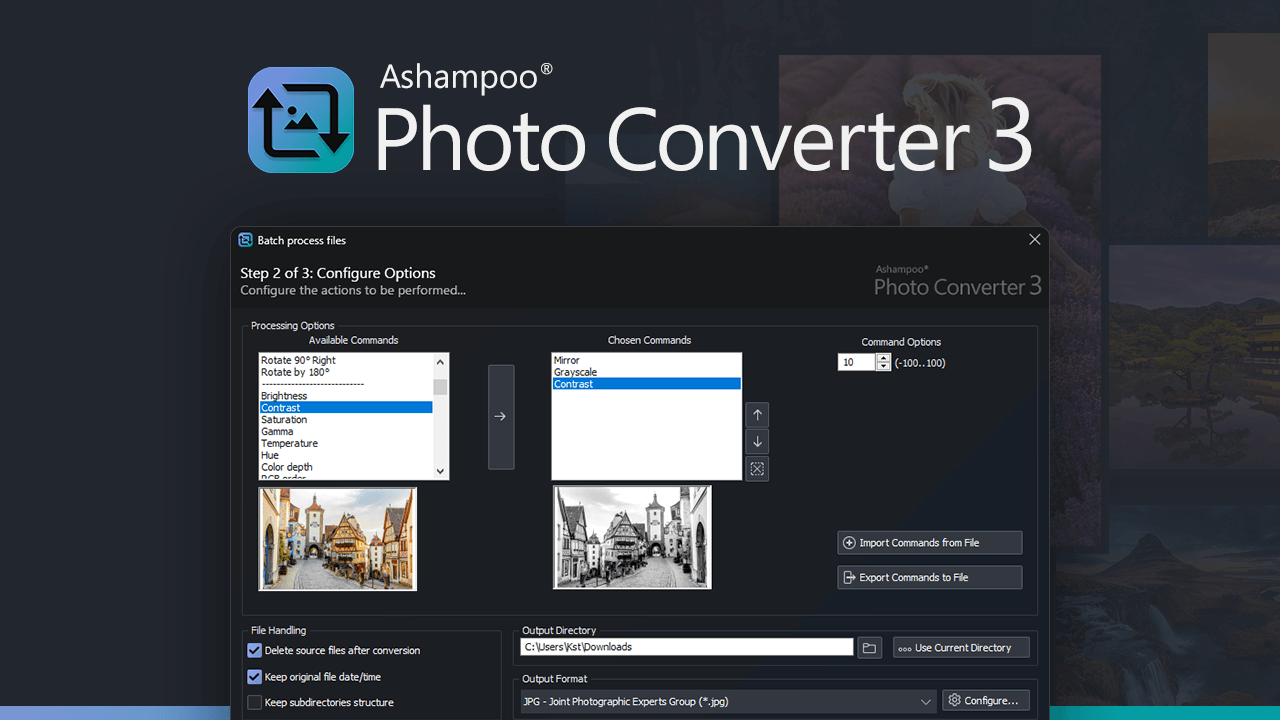
New batch wizard with drop-and-drop support and a sortable command list
Ability to export and reuse a command list (*.apcbatch files)
DPI-based resizing with precise inch specifications
Command-line mode with advanced parameter control for automated workflow
Easily apply frames and change aspect ratios during batch processing
Full-featured command-line tool with over 10 parameters
Automated processing with logging and output format selection in the command-line interface
The application allows you to rotate, flip, and scale images, change aspect ratios, You can also adjust image parameters: brightness, contrast, hue, saturation, and color depth. Creative effects are available for design, such as sepia, black and white, oil painting, and pencil sketch. You can add watermarks and display the original file´s creation date on your photos.
⏱️ Instant delivery! ✔️100% Guarantee.
💰 Discount for regular customers! Cashback for positive reviews.
💬 Support available for any problems or questions.
📌 Unique KEY, NOT reusable, can only be activated once.
Activate within 14 days of purchase; no claims will be accepted after this time.
Key feature: easy handling of large file sets in a single launch. Ashampoo Photo Converter 3 supports processing entire folders, preserving the directory structure, and applying the same workflow to all images, which is especially useful for preparing photo archives, website content, and mass-producing images.
Ashampoo Photo Converter 3 offers a wide range of tools for creative and technical image editing. Choose from a variety of formats, rotate, flip, or skew your photos, and resize them by percentage, pixels, inches, or centimeters. Optimize contrast and color manually or automatically, increase color intensity, reduce compression distortion, and fine-tune gamma, brightness, depth, and saturation. Apply various effects such as sepia, black and white, oil painting, borders, aspect ratio adjustments, pencil sketch, embossing, and sharpening. Protect your work with a freely positionable watermark and take advantage of options such as inserting the original shooting date, preserving file timestamps, or automatically deleting originals after conversion for complete control and better organization.
Format compatibility has also been expanded, with improved support for HEIF, SVG, and modern RAW formats (including Canon, Nikon, and DNG).
A program for fast image conversion and batch processing with command line support. Supports modern formats, effects, RAW files, DPI scaling, and workflow automation.
Image conversion has never been so easy or so powerful.
A perpetual license for Ashampoo Photo Converter 3 is sold here.
Original. Official.
Global key for any country - key global.
Supported OS: Windows 11, Windows 10 (x64)
My personal keys, NOT for resale, no discounts, no lower prices available at this time. If you see a cheaper price, consider its origin and the risks involved.Original. Official.
Global key for any country - key global.
Supported OS: Windows 11, Windows 10 (x64)
Two modes: a simple interface for beginners and a powerful command-line interface for professionals and server-based use
64-bit support for optimal memory usage
Modern interface with animated progress bar
Faster PNG and JPG processing (up to 50 times faster)
Extended format support: HEIF, RAW (including Canon, Nikon, DNG), SVG
New batch wizard with drop-and-drop support and a sortable command list
Ability to export and reuse a command list (*.apcbatch files)
DPI-based resizing with precise inch specifications
Command-line mode with advanced parameter control for automated workflow
Easily apply frames and change aspect ratios during batch processing
Full-featured command-line tool with over 10 parameters
Automated processing with logging and output format selection in the command-line interface
The application allows you to rotate, flip, and scale images, change aspect ratios, You can also adjust image parameters: brightness, contrast, hue, saturation, and color depth. Creative effects are available for design, such as sepia, black and white, oil painting, and pencil sketch. You can add watermarks and display the original file´s creation date on your photos.
⏱️ Instant delivery! ✔️100% Guarantee.
💰 Discount for regular customers! Cashback for positive reviews.
💬 Support available for any problems or questions.
📌 Unique KEY, NOT reusable, can only be activated once.
Activate within 14 days of purchase; no claims will be accepted after this time.
Key feature: easy handling of large file sets in a single launch. Ashampoo Photo Converter 3 supports processing entire folders, preserving the directory structure, and applying the same workflow to all images, which is especially useful for preparing photo archives, website content, and mass-producing images.
Ashampoo Photo Converter 3 offers a wide range of tools for creative and technical image editing. Choose from a variety of formats, rotate, flip, or skew your photos, and resize them by percentage, pixels, inches, or centimeters. Optimize contrast and color manually or automatically, increase color intensity, reduce compression distortion, and fine-tune gamma, brightness, depth, and saturation. Apply various effects such as sepia, black and white, oil painting, borders, aspect ratio adjustments, pencil sketch, embossing, and sharpening. Protect your work with a freely positionable watermark and take advantage of options such as inserting the original shooting date, preserving file timestamps, or automatically deleting originals after conversion for complete control and better organization.
Format compatibility has also been expanded, with improved support for HEIF, SVG, and modern RAW formats (including Canon, Nikon, and DNG).
Add to bookmarks and visit our store ➡️ https://www.top.steamkeygift.ru/seller/147467 ✔️
All products are tested, working, guaranteed. We have been working on the site since 2010.
✍🏻Please leave a review, we will be pleased;)
All products are tested, working, guaranteed. We have been working on the site since 2010.
✍🏻Please leave a review, we will be pleased;)
No feedback yet