Windows 10 11 Enterprise LTSC MAK Key Volume License
Content: text (0 symbol)
Available: 1
Uploaded:
Positive responses: 0
Negative responses: 0
Sold: 0
Refunds: 0
$28.07
WHAT YOU RECEIVE:
1x Digital Microsoft Windows Enterprise / LTSC MAK Volume License Key.
Choose your edition and activation count from the options above before purchasing.
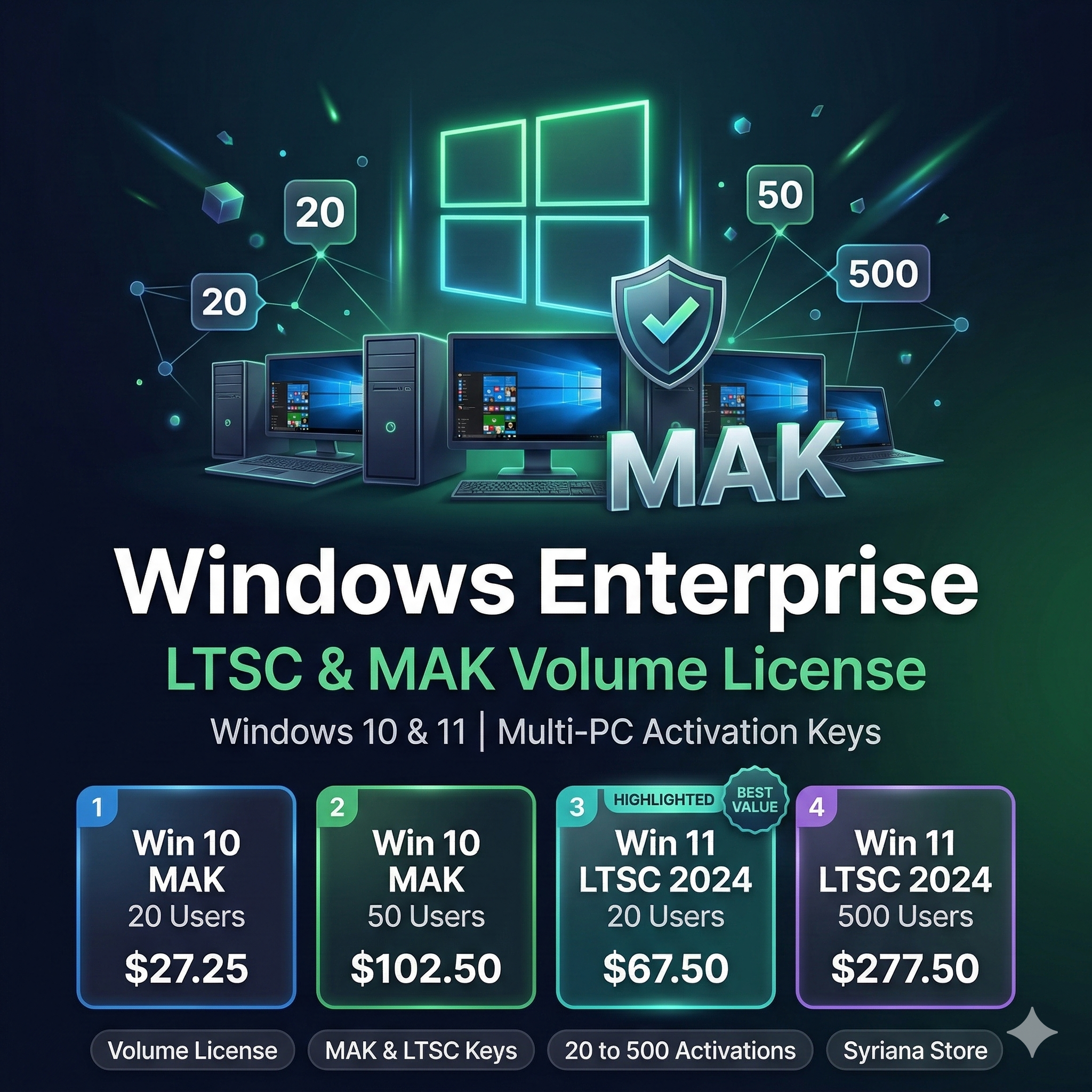
AVAILABLE OPTIONS:
Windows 10 Enterprise MAK:
- Windows 10 Enterprise MAK (20 Activations)
- Windows 10 Enterprise MAK (50 Activations)
- Windows 10 Enterprise MAK (500 Activations)
Windows 11 Enterprise LTSC 2024:
- Windows 11 Enterprise LTSC 2024 (20 Activations)
- Windows 11 Enterprise LTSC 2024 (500 Activations)
Windows 10 Enterprise LTSC 2021:
- Windows 10 Enterprise LTSC 2021
LICENSE DETAILS:
- License type: MAK Volume License Key
- Language: Multilingual
- Regional binding: None (worldwide)
- License validity: Lifetime (permanent)
- Multi-PC activation supported
DELIVERY:
Manual delivery. After payment, you will receive a unique code.
Please send this unique code to us via the platform messaging system.
Delivery time: 2 to 48 hours maximum.
SUPPORT:
Contact us through the platform messaging system. We respond within 24 hours.
1x Digital Microsoft Windows Enterprise / LTSC MAK Volume License Key.
Choose your edition and activation count from the options above before purchasing.
AVAILABLE OPTIONS:
Windows 10 Enterprise MAK:
- Windows 10 Enterprise MAK (20 Activations)
- Windows 10 Enterprise MAK (50 Activations)
- Windows 10 Enterprise MAK (500 Activations)
Windows 11 Enterprise LTSC 2024:
- Windows 11 Enterprise LTSC 2024 (20 Activations)
- Windows 11 Enterprise LTSC 2024 (500 Activations)
Windows 10 Enterprise LTSC 2021:
- Windows 10 Enterprise LTSC 2021
LICENSE DETAILS:
- License type: MAK Volume License Key
- Language: Multilingual
- Regional binding: None (worldwide)
- License validity: Lifetime (permanent)
- Multi-PC activation supported
DELIVERY:
Manual delivery. After payment, you will receive a unique code.
Please send this unique code to us via the platform messaging system.
Delivery time: 2 to 48 hours maximum.
SUPPORT:
Contact us through the platform messaging system. We respond within 24 hours.
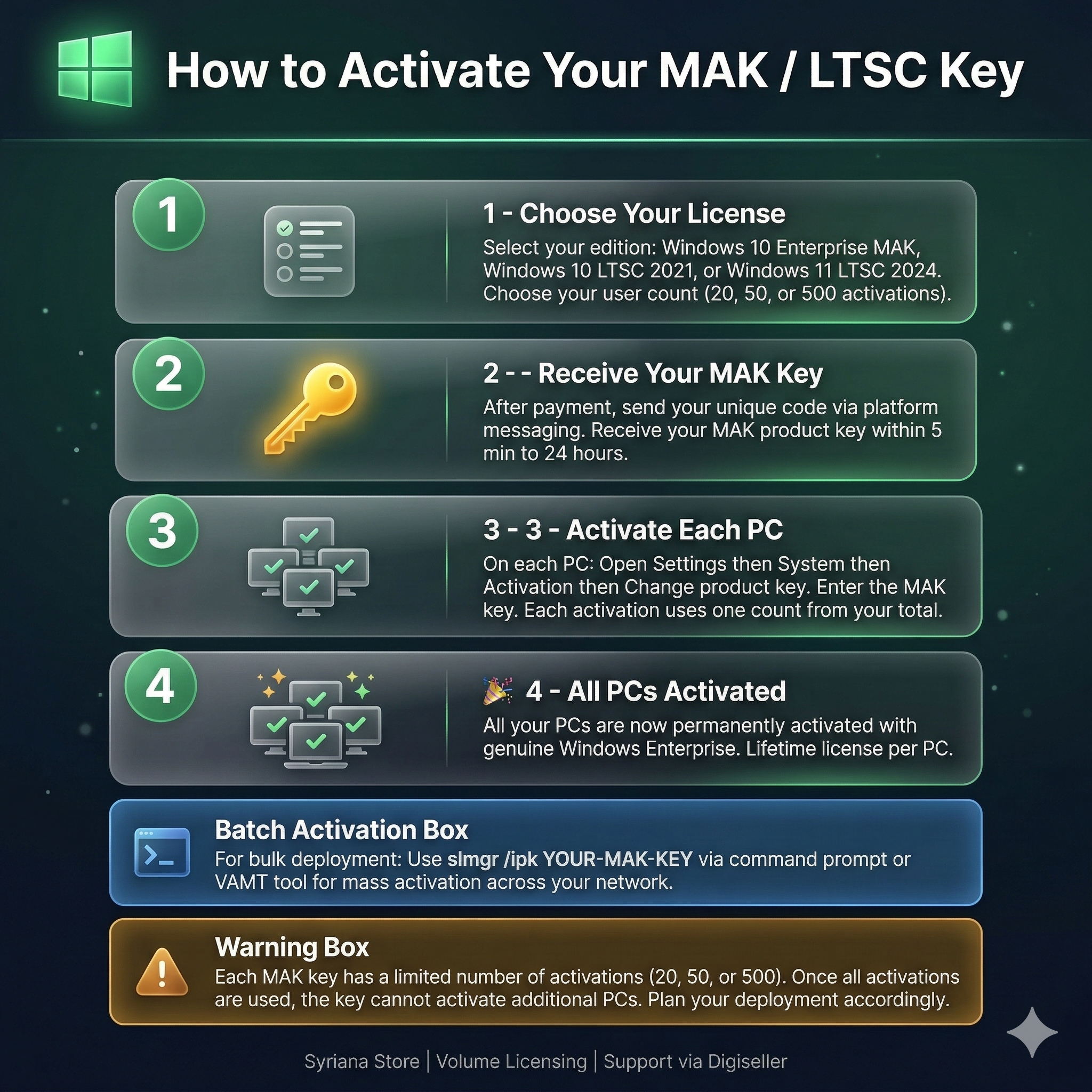
HOW TO ACTIVATE YOUR WINDOWS ENTERPRISE / LTSC MAK KEY:
For Single PC Activation:
1. After payment, you will receive the MAK product key via platform messaging.
2. Open Settings > System > Activation > Change product key.
3. Enter the 25-character MAK key and click Activate.
4. Wait for activation confirmation.
5. Alternative via CMD (Run as Administrator):
- Type: slmgr /ipk YOUR-MAK-KEY-HERE
- Then type: slmgr /ato
- Wait for activation confirmation popup.
For Bulk Deployment (Multiple PCs):
1. Install VAMT (Volume Activation Management Tool) on a management PC.
2. Add target PCs to VAMT via Active Directory, IP range, or manual entry.
3. Enter the MAK key in VAMT.
4. Select target PCs and activate remotely via proxy activation.
5. VAMT will track remaining activations automatically.
OFFICIAL DOWNLOAD LINKS:
- Windows 10 Enterprise: https://www.microsoft.com/en-us/evalcenter/evaluate-windows-10-enterprise
- Windows 11 Enterprise: https://www.microsoft.com/en-us/evalcenter/evaluate-windows-11-enterprise
- Windows 10 LTSC 2021: https://www.microsoft.com/en-us/evalcenter/evaluate-windows-10-enterprise-ltsc-2021
TROUBLESHOOTING:
- If activation fails, check internet connection and try again.
- Run CMD as Administrator for slmgr commands.
- Ensure correct Windows edition matches the key (Enterprise vs LTSC).
- If the key does not work, contact us immediately. We will replace or refund per platform rules.
Syriana Store - Your Trusted Digital License Provider
For Single PC Activation:
1. After payment, you will receive the MAK product key via platform messaging.
2. Open Settings > System > Activation > Change product key.
3. Enter the 25-character MAK key and click Activate.
4. Wait for activation confirmation.
5. Alternative via CMD (Run as Administrator):
- Type: slmgr /ipk YOUR-MAK-KEY-HERE
- Then type: slmgr /ato
- Wait for activation confirmation popup.
For Bulk Deployment (Multiple PCs):
1. Install VAMT (Volume Activation Management Tool) on a management PC.
2. Add target PCs to VAMT via Active Directory, IP range, or manual entry.
3. Enter the MAK key in VAMT.
4. Select target PCs and activate remotely via proxy activation.
5. VAMT will track remaining activations automatically.
OFFICIAL DOWNLOAD LINKS:
- Windows 10 Enterprise: https://www.microsoft.com/en-us/evalcenter/evaluate-windows-10-enterprise
- Windows 11 Enterprise: https://www.microsoft.com/en-us/evalcenter/evaluate-windows-11-enterprise
- Windows 10 LTSC 2021: https://www.microsoft.com/en-us/evalcenter/evaluate-windows-10-enterprise-ltsc-2021
TROUBLESHOOTING:
- If activation fails, check internet connection and try again.
- Run CMD as Administrator for slmgr commands.
- Ensure correct Windows edition matches the key (Enterprise vs LTSC).
- If the key does not work, contact us immediately. We will replace or refund per platform rules.
Syriana Store - Your Trusted Digital License Provider
No feedback yet