Quick Calculator for Furniture Drawings and Details
Content: Калькулятор Мебельный.html (161.93 KB)
Uploaded: 26.03.2026
Positive responses: 0
Negative responses: 0
Sold: 0
Refunds: 0
$13.75



NAME
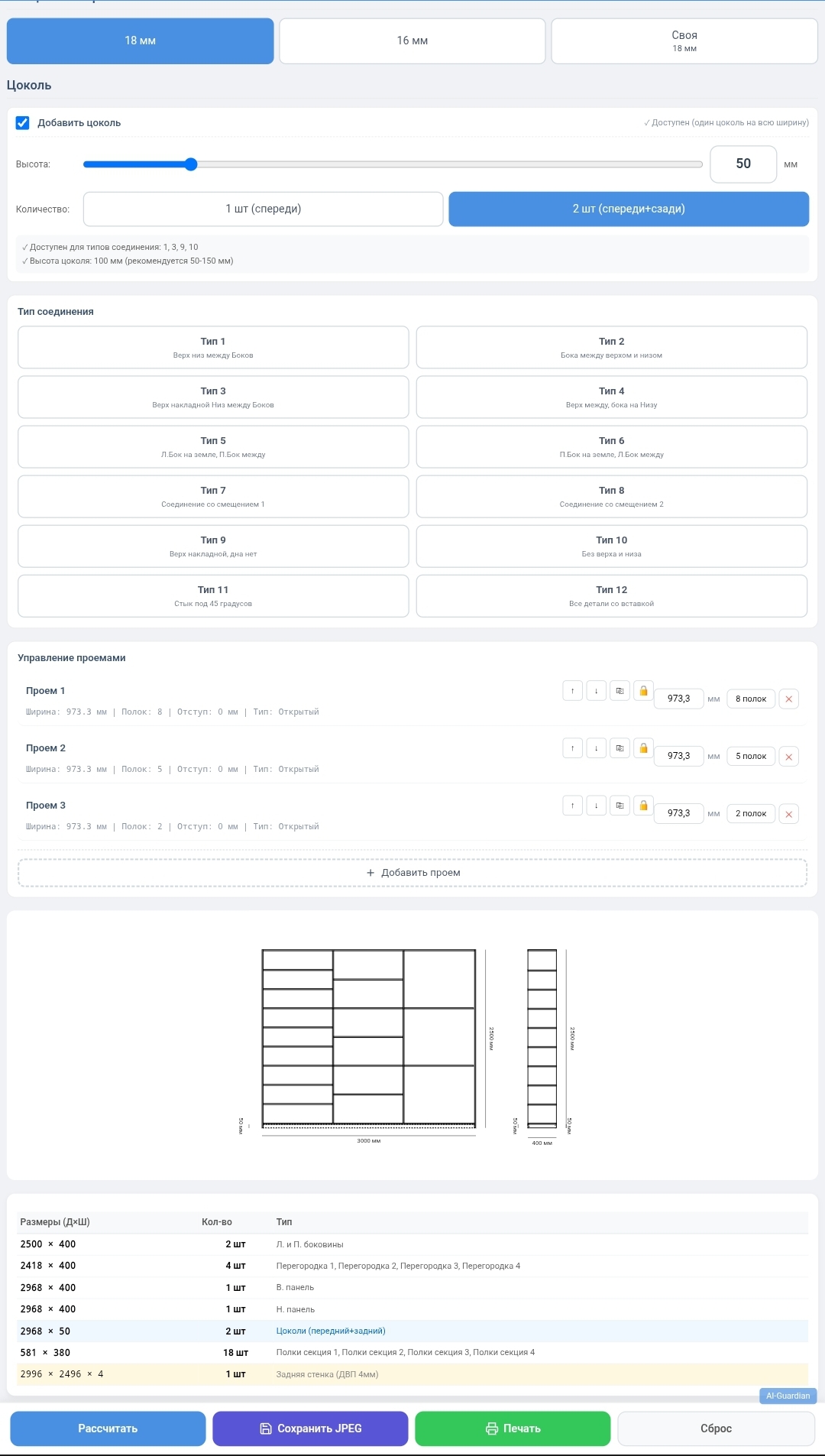
Furniture calculator: drawings and detailing of cabinets in seconds. Save up to 2 hours!
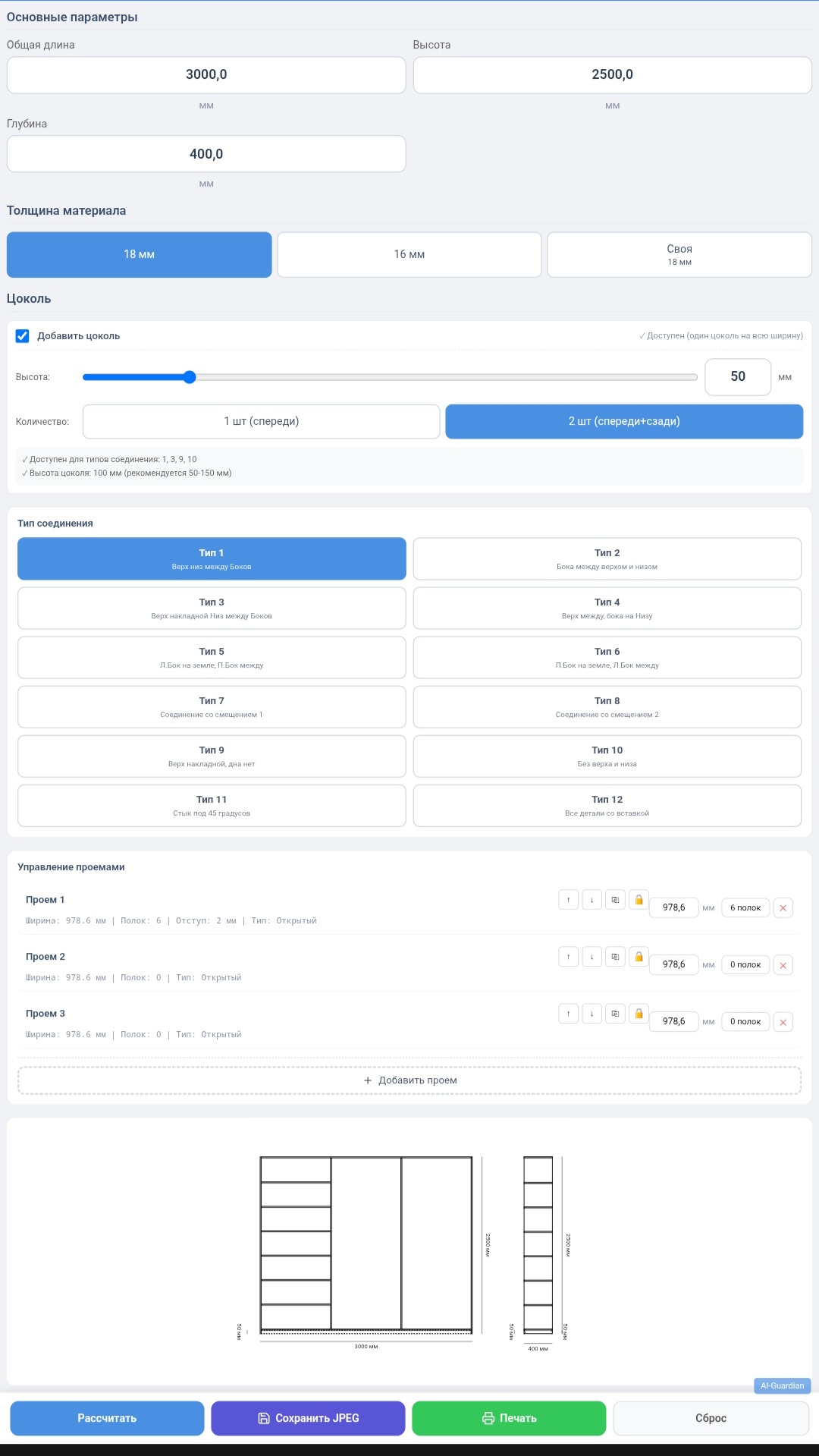
Instant calculation of cabinet furniture (cabinets) with visualization of the drawing and full detailing. Suitable for professionals and home DIYers. Saves 1 to 2 hours of working time on each project. Works without the Internet, can be installed on your phone as an application.
Create cabinet designs of any complexity in minutes!
This tool is your personal assistant in designing cabinet furniture. Forget about hours-long calculations in Excel and manual drawing. Just enter the dimensions, select the type of connection, configure the openings and shelves - and get a finished drawing with precise detailing.
---
MAIN ADVANTAGES
✅ Time saving from 1 to 2 hours per project
Instead of manually calculating all the details, taking into account the thickness of the material and types of connections, you get the result instantly. Rapid prototyping: change the dimensions, number of sections, shelves - the drawing and detailing are updated automatically. You complete one project instead of two hours in two minutes.
✅ Professional precision
12 connection types are supported:
1. Top and bottom between sides
2. Sides between top and bottom
3. Top of the invoice, bottom between the sides
4. Top between, sides on bottom
5. Left side on the floor, right between
6. Right side on the floor, left between
7–8. Offset connections
7. Top of the invoice, no bottom
8. Without top and bottom (only sides)
9. Joint at 45 degrees
10. All parts with insert
Automatic accounting of the plinth (height from 0 to 300 mm, one or two plinths - front and back), partitions, shelf distances from the edges (0–30 mm). All dimensions are in millimeters, accurate to tenths.
✅ Visualization of 2D drawing
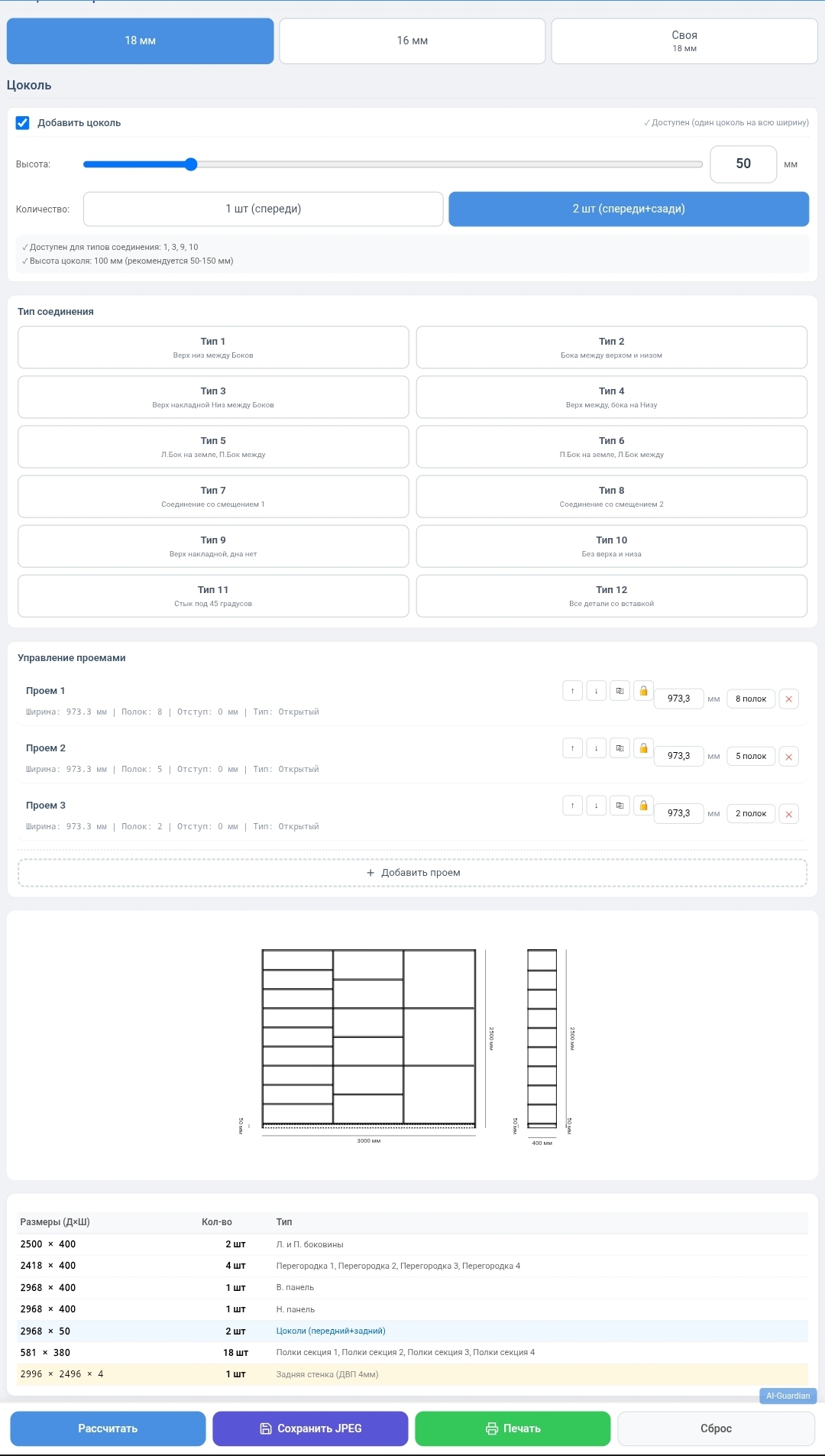
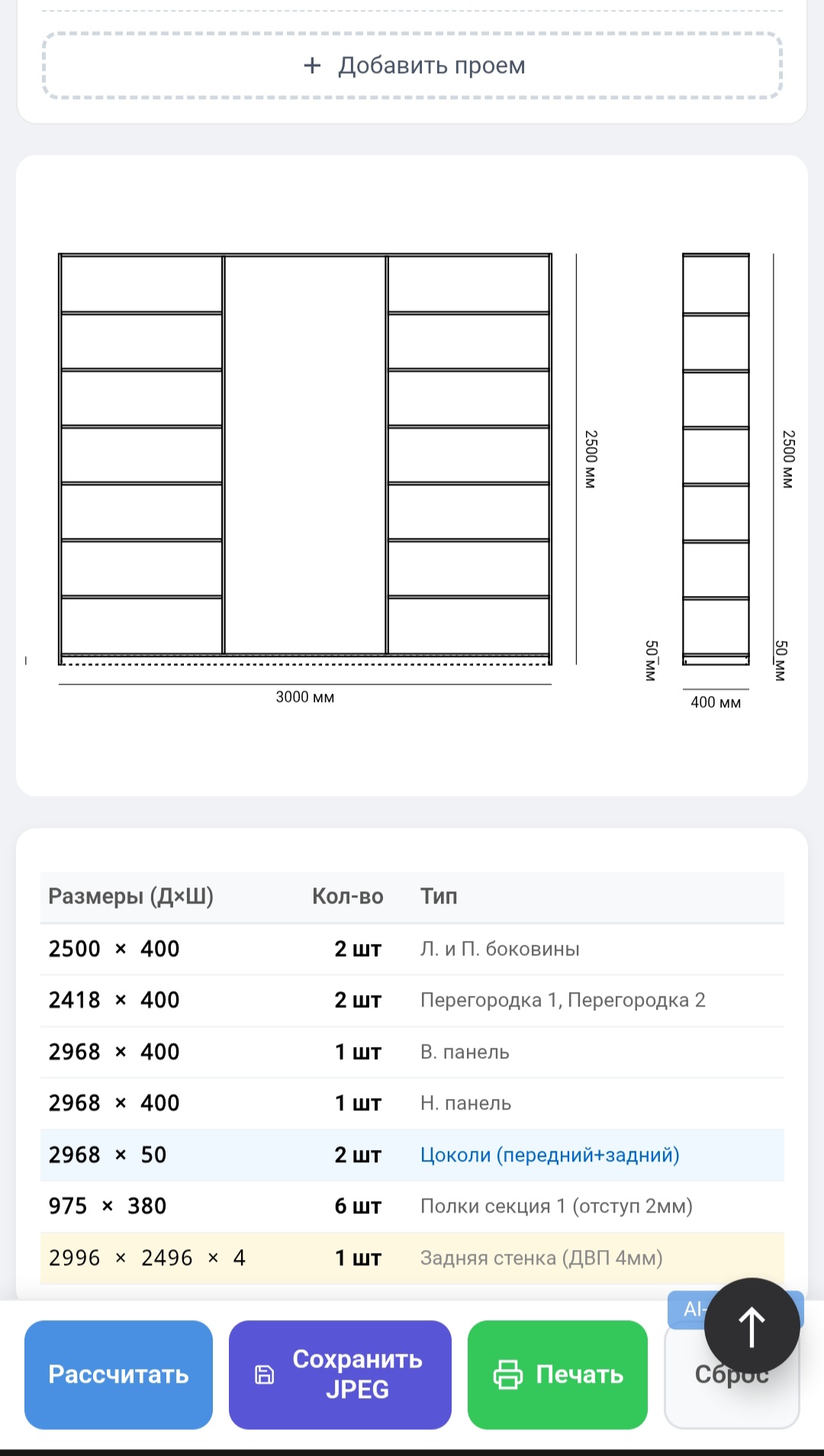
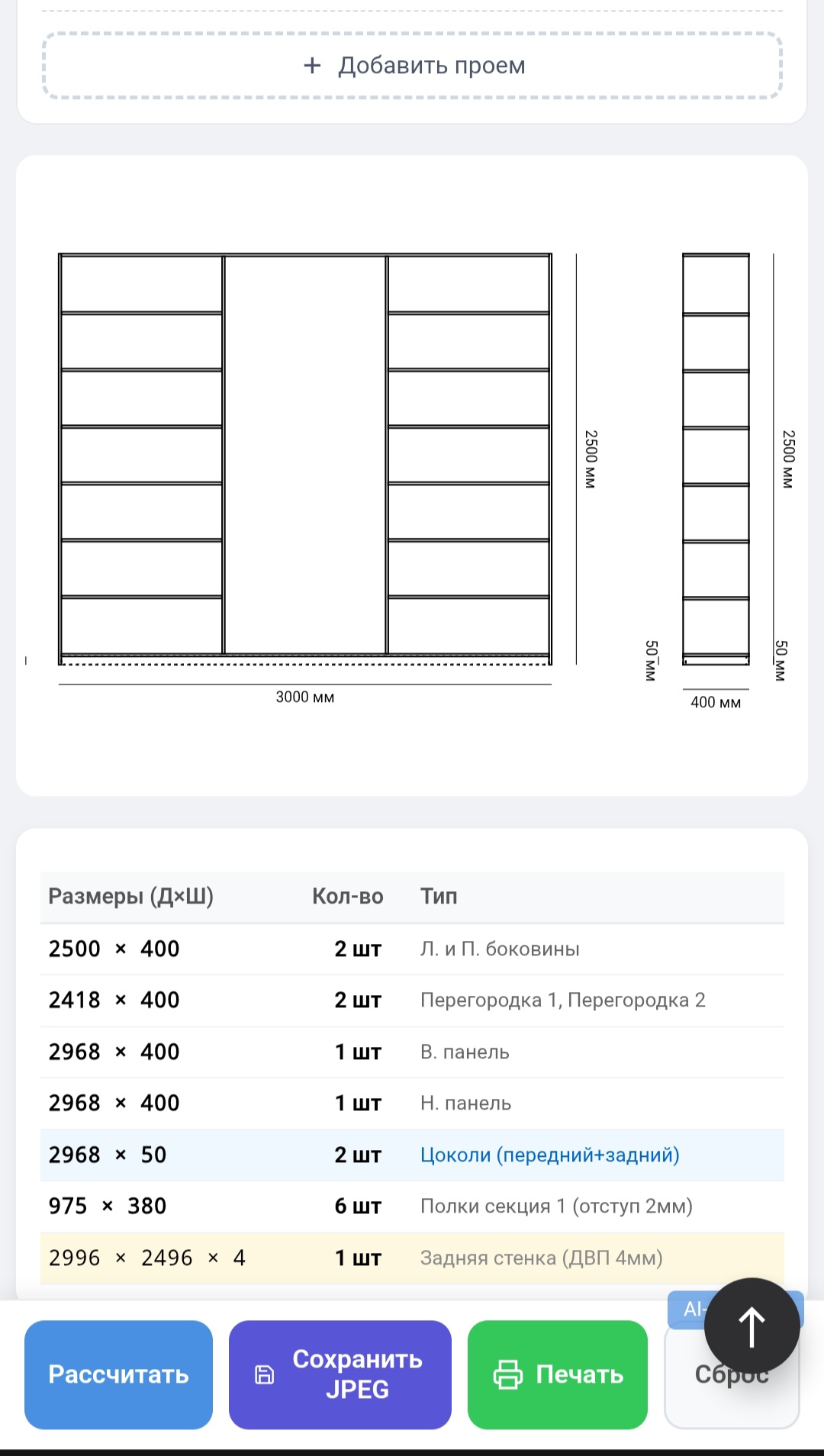
Visual drawing from front and side with dimension lines. Scales to fit any size, from miniature shelves to huge cabinets. All details are displayed: sides, top/bottom, partitions, shelves, base.
✅ Full details
Table of all parts with dimensions (length × width), quantity and type:
Sidewalls (left, right)
· Top panel
Bottom panel
· Partitions between sections
· Shelves (including indentations)
Base (front, rear)
· Rear wall (fibreboard 4 mm)
Ideal for creating cutting plans and ordering materials.
✅ Flexible configuration of openings
Up to 10 independent sections. Each one can be adjusted in width, blocked, and changed order by dragging and dropping. Shelves with the possibility of indentation from the edges for decorative solutions or installation of facades.
✅ Save and export
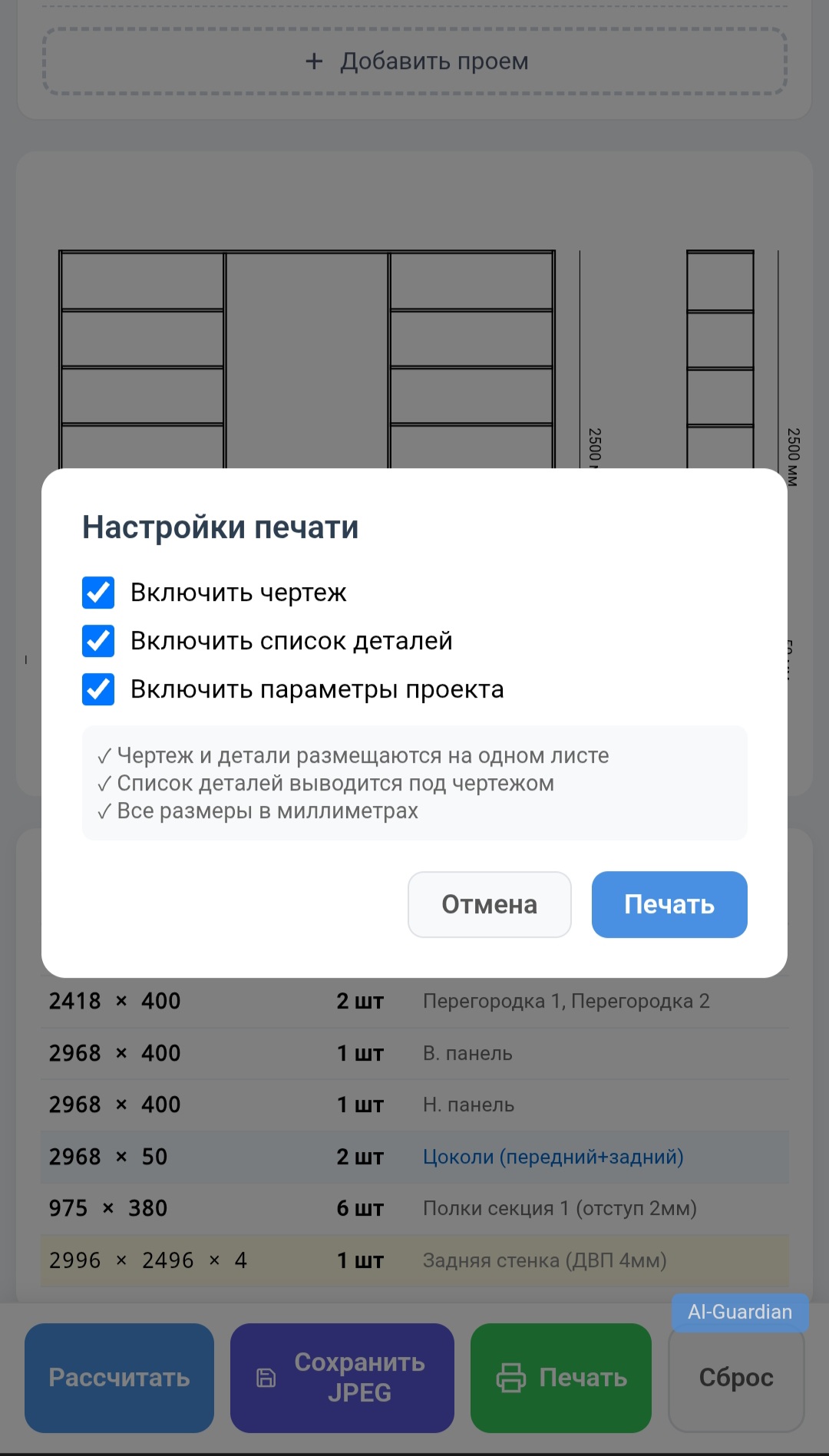
The project is automatically saved in the browser - you won’t lose any data. The drawing can be saved as a JPEG, and the parts table can be printed or sent for printing.
✅ Works without internet
Download it once and use it anywhere, even in a workshop without Wi-Fi. Can be installed on your phone as an application (PWA) - always at hand.
---
RANGE OF SIZES AND MATERIALS
Parameter Minimum Maximum Step
Overall width 0.3 mm 6000 mm 0.1
Height 0.3 mm 6000 mm 0.1
Depth 0.1 mm 1500 mm 0.1
Material thickness 0.1 mm 150 mm 0.1
Opening width (section) 0 mm 5999.8 mm 0.1
Plinth height 0 mm 300 mm 1
Suitable for any materials:
· Chipboard (laminated, 16–18 mm) - the most popular material for cabinet furniture
MDF (16–19 mm) - for facades and moisture-resistant structures
· Solid wood (18–40 mm) – for luxury furniture
· Plywood (6–21 mm) - for frames and rough furniture
· Plastic, acrylic, glass - for inserts and decorative elements
The program automatically adjusts the dimensions of parts to a given thickness, takes into account edge allowances, gaps for shelves and partitions.
---
AREAS OF APPLICATION
🏭 Furniture workshops and private manufacturers
· Quick calculations for customers, demonstration of drawings on site
· Savi
Furniture calculator: drawings and detailing of cabinets in seconds. Save up to 2 hours!
Instant calculation of cabinet furniture (cabinets) with visualization of the drawing and full detailing. Suitable for professionals and home DIYers. Saves 1 to 2 hours of working time on each project. Works without the Internet, can be installed on your phone as an application.
Create cabinet designs of any complexity in minutes!
This tool is your personal assistant in designing cabinet furniture. Forget about hours-long calculations in Excel and manual drawing. Just enter the dimensions, select the type of connection, configure the openings and shelves - and get a finished drawing with precise detailing.
---
MAIN ADVANTAGES
✅ Time saving from 1 to 2 hours per project
Instead of manually calculating all the details, taking into account the thickness of the material and types of connections, you get the result instantly. Rapid prototyping: change the dimensions, number of sections, shelves - the drawing and detailing are updated automatically. You complete one project instead of two hours in two minutes.
✅ Professional precision
12 connection types are supported:
1. Top and bottom between sides
2. Sides between top and bottom
3. Top of the invoice, bottom between the sides
4. Top between, sides on bottom
5. Left side on the floor, right between
6. Right side on the floor, left between
7–8. Offset connections
7. Top of the invoice, no bottom
8. Without top and bottom (only sides)
9. Joint at 45 degrees
10. All parts with insert
Automatic accounting of the plinth (height from 0 to 300 mm, one or two plinths - front and back), partitions, shelf distances from the edges (0–30 mm). All dimensions are in millimeters, accurate to tenths.
✅ Visualization of 2D drawing
Visual drawing from front and side with dimension lines. Scales to fit any size, from miniature shelves to huge cabinets. All details are displayed: sides, top/bottom, partitions, shelves, base.
✅ Full details
Table of all parts with dimensions (length × width), quantity and type:
Sidewalls (left, right)
· Top panel
Bottom panel
· Partitions between sections
· Shelves (including indentations)
Base (front, rear)
· Rear wall (fibreboard 4 mm)
Ideal for creating cutting plans and ordering materials.
✅ Flexible configuration of openings
Up to 10 independent sections. Each one can be adjusted in width, blocked, and changed order by dragging and dropping. Shelves with the possibility of indentation from the edges for decorative solutions or installation of facades.
✅ Save and export
The project is automatically saved in the browser - you won’t lose any data. The drawing can be saved as a JPEG, and the parts table can be printed or sent for printing.
✅ Works without internet
Download it once and use it anywhere, even in a workshop without Wi-Fi. Can be installed on your phone as an application (PWA) - always at hand.
---
RANGE OF SIZES AND MATERIALS
Parameter Minimum Maximum Step
Overall width 0.3 mm 6000 mm 0.1
Height 0.3 mm 6000 mm 0.1
Depth 0.1 mm 1500 mm 0.1
Material thickness 0.1 mm 150 mm 0.1
Opening width (section) 0 mm 5999.8 mm 0.1
Plinth height 0 mm 300 mm 1
Suitable for any materials:
· Chipboard (laminated, 16–18 mm) - the most popular material for cabinet furniture
MDF (16–19 mm) - for facades and moisture-resistant structures
· Solid wood (18–40 mm) – for luxury furniture
· Plywood (6–21 mm) - for frames and rough furniture
· Plastic, acrylic, glass - for inserts and decorative elements
The program automatically adjusts the dimensions of parts to a given thickness, takes into account edge allowances, gaps for shelves and partitions.
---
AREAS OF APPLICATION
🏭 Furniture workshops and private manufacturers
· Quick calculations for customers, demonstration of drawings on site
· Savi
EXAMPLES OF USE
1. Built-in wardrobe in a niche
You measure the opening, enter the dimensions, select the type of connection (for example, with a plinth), configure the number of shelves - you get the exact dimensions of the parts to order cutting. The drawing helps to visualize the location of shelves and partitions.
2. Kitchen module
You set general dimensions, add several sections with different widths, design drawers in one section (specify 2-3 shelves in the shelf settings), and get details for assembly. The plinth can be adjusted separately; you can make it front and rear.
3. Dressing room
Design a storage system for the entire wall: up to 10 sections, each with its own content. A drawing with dimensions will help you visualize the future dressing room, and detailing will help you order materials.
4. Office furniture
Quickly calculate shelving, filing cabinets, modular partitions. Save time when selecting the optimal dimensions for the room.
5. On-site design for the client
We came to the customer with a phone number, took measurements, showed the drawing, adjusted the number of shelves, sent the client a JPEG of the drawing and specification - all in 15 minutes.
TECHNICAL DETAILS
· Format: single HTML file with integrated CSS and JavaScript
· Opens in any modern browser: Chrome, Firefox, Safari, Edge, Opera
· Devices: computer (Windows, Mac, Linux), phone (Android, iOS), tablet
· Requirements: browser supporting HTML5 and JavaScript (all modern)
· Operation: completely autonomous, does not require installation, registration, or Internet access after downloading
· PWA: can be installed on your phone´s home screen and used as a native app (Add to Home Screen feature in Chrome)
---
WHAT WILL YOU RECEIVE AFTER PURCHASE
You will receive an index.html file (the main page of the calculator). Just open index.html in your browser. Everything is ready to go!
· Furniture calculator.html - the calculator itself
WHY SHOULD YOU BUY THIS TOOL?
Save time You complete one project in 2 minutes instead of 2 hours. With 10 projects per month, savings - 20 hours
No errors Automatic calculation eliminates the human factor: do not forget to take into account the thickness of the material, partitions, gaps
Accessibility Works on any device, even your phone. No need to buy expensive software
Payback By saving on the first project, you return the purchase price. Next is net profit
Ready-made specifications The list of parts can be immediately sent to the workshop for cutting or to the accounting department for estimates
---
IMPORTANT NOTE
The program is designed for calculating cabinet furniture (cabinets, racks, cabinets) using standard straight parts. It is not CAD and does not replace professional design for non-standard structures with curved shapes, but for 90% of standard solutions it is an ideal tool.
---
Start saving your time today!
Just click “Buy”, download the archive, open the file - and the calculator is ready to use. No complicated setup, no registration, no internet.
1. Built-in wardrobe in a niche
You measure the opening, enter the dimensions, select the type of connection (for example, with a plinth), configure the number of shelves - you get the exact dimensions of the parts to order cutting. The drawing helps to visualize the location of shelves and partitions.
2. Kitchen module
You set general dimensions, add several sections with different widths, design drawers in one section (specify 2-3 shelves in the shelf settings), and get details for assembly. The plinth can be adjusted separately; you can make it front and rear.
3. Dressing room
Design a storage system for the entire wall: up to 10 sections, each with its own content. A drawing with dimensions will help you visualize the future dressing room, and detailing will help you order materials.
4. Office furniture
Quickly calculate shelving, filing cabinets, modular partitions. Save time when selecting the optimal dimensions for the room.
5. On-site design for the client
We came to the customer with a phone number, took measurements, showed the drawing, adjusted the number of shelves, sent the client a JPEG of the drawing and specification - all in 15 minutes.
TECHNICAL DETAILS
· Format: single HTML file with integrated CSS and JavaScript
· Opens in any modern browser: Chrome, Firefox, Safari, Edge, Opera
· Devices: computer (Windows, Mac, Linux), phone (Android, iOS), tablet
· Requirements: browser supporting HTML5 and JavaScript (all modern)
· Operation: completely autonomous, does not require installation, registration, or Internet access after downloading
· PWA: can be installed on your phone´s home screen and used as a native app (Add to Home Screen feature in Chrome)
---
WHAT WILL YOU RECEIVE AFTER PURCHASE
You will receive an index.html file (the main page of the calculator). Just open index.html in your browser. Everything is ready to go!
· Furniture calculator.html - the calculator itself
WHY SHOULD YOU BUY THIS TOOL?
Save time You complete one project in 2 minutes instead of 2 hours. With 10 projects per month, savings - 20 hours
No errors Automatic calculation eliminates the human factor: do not forget to take into account the thickness of the material, partitions, gaps
Accessibility Works on any device, even your phone. No need to buy expensive software
Payback By saving on the first project, you return the purchase price. Next is net profit
Ready-made specifications The list of parts can be immediately sent to the workshop for cutting or to the accounting department for estimates
---
IMPORTANT NOTE
The program is designed for calculating cabinet furniture (cabinets, racks, cabinets) using standard straight parts. It is not CAD and does not replace professional design for non-standard structures with curved shapes, but for 90% of standard solutions it is an ideal tool.
---
Start saving your time today!
Just click “Buy”, download the archive, open the file - and the calculator is ready to use. No complicated setup, no registration, no internet.
No feedback yet