Neural network-powered text-to-speech in Russian and English directly on your compute
Content: text (0 symbol)
Uploaded: 22.05.2026
Positive responses: 0
Negative responses: 0
Sold: 0
Refunds: 0
$5.32
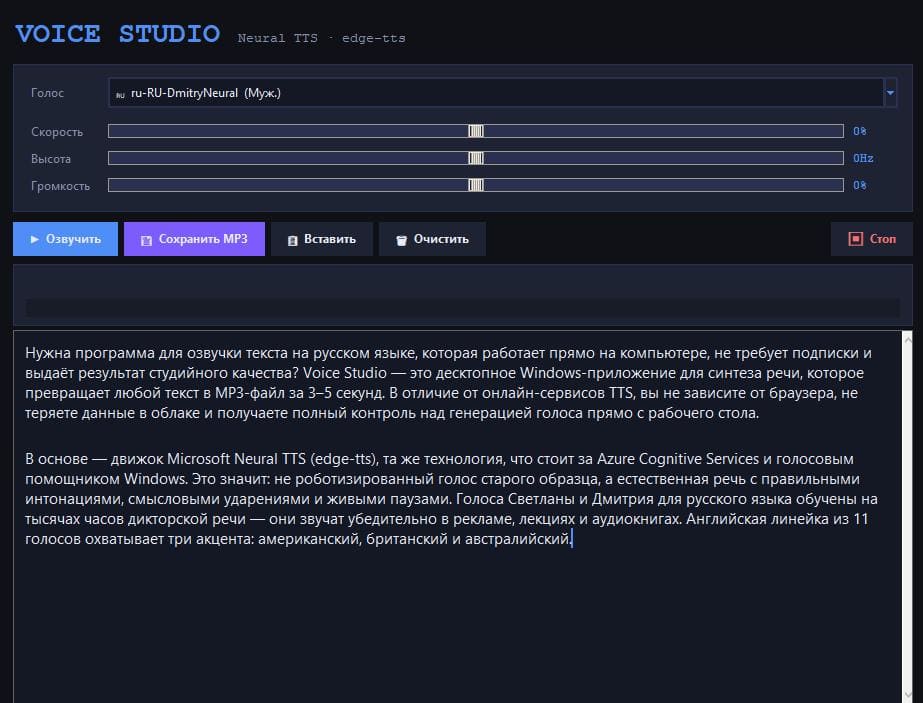
VOICE STUDIO — NEURAL NETWORK TEXT TRANSCRIPT IN RUSSIAN AND ENGLISH (PC, WINDOWS)
Full version forever. No subscriptions or character limits.
Voice Studio is a convenient Windows program for professional text translation. It converts written text into natural speech and saves it as an MP3 in seconds. It uses Microsoft Neural TTS (Azure Cognitive Services). Voices sound lifelike: with intonation, pauses, and stress—no robotic effect.
WHY CHOOSE VOICE STUDIO
- One-time payment – unlimited use
- Ready-to-use application with interface (no Python or command line required)
- High-quality Microsoft neural voices for Russian and English
- Adjustable speed, pitch, and volume
- MP3s are saved only to your computer
- Works on Windows 10 and 11
WHAT THE PROGRAM DOES
- Russian: female voice "Svetlana" and male voice "Dmitry." Suitable for audiobooks, advertising, videos, and courses.
- English: 11 voices with accents (US, UK, Australia): Jenny, Aria, Guy, Davis, Sonia, Ryan, Natasha, and others.
- Fine-tuning of voice: speed (±50), pitch (±20 Hz), volume (±50).
- Instant playback and saving as MP3.
- Convenient tools: paste from clipboard, clear field, stop synthesis, progress bar.
- Dark interface that´s easy on the eyes.
Example of the program in action: https://youtu.be/2_QTKx2Yx0g
WHO WILL THIS BE USEFUL FOR
- Authors, bloggers, and journalists (audio versions of articles, podcasts)
- Teachers and course authors (lecture dubbing)
- Marketers and advertisers (voiceovers)
- YouTube bloggers and video production (voiceovers)
- Audiobook authors (publishing on LitRes, Storytel)
- Business (answering machines, presentations)
- Developers (voice interface testing)
HOW TO WORK WITH VOICE STUDIO
1. Download and install the program.
2. Paste the text into the editor field.
3. Select a voice and adjust the speed, pitch, and volume if desired.
4. Click "Speak" to hear the result immediately.
5. Save the finished MP3 file to the desired folder.
The program doesn´t store your text. It works with any size—from short messages to entire book chapters.
LICENSE TERMS
- Lifetime license for 1 device.
- One payment.
- Up to 5 reinstallations on one computer.
- Hardware-based (copy protection).
- No subscriptions, limits, or hidden fees.
SYSTEM REQUIREMENTS
- Operating system: Windows 10/11 (64-bit)
- Installation: single EXE file, Next -> Next -> Finish
- Internet connection: required for synthesis (Microsoft Azure servers)
- RAM: 1 GB or more
- Disk space: approximately 80 MB (installed program)
- Program language: Russian
- Screen resolution: minimum 1024x600, recommended 1280x720 or higher
Voice Studio replaces expensive online services and studio recording. High-quality voiceovers – no monthly fees. Pay once and create professional audio materials for years.
Ready to voice studio-quality texts directly on your computer?
Example of the program in action: https://youtu.be/2_QTKx2Yx0g
Click "Buy" and get access immediately after payment.
Full version forever. No subscriptions or character limits.
Voice Studio is a convenient Windows program for professional text translation. It converts written text into natural speech and saves it as an MP3 in seconds. It uses Microsoft Neural TTS (Azure Cognitive Services). Voices sound lifelike: with intonation, pauses, and stress—no robotic effect.
WHY CHOOSE VOICE STUDIO
- One-time payment – unlimited use
- Ready-to-use application with interface (no Python or command line required)
- High-quality Microsoft neural voices for Russian and English
- Adjustable speed, pitch, and volume
- MP3s are saved only to your computer
- Works on Windows 10 and 11
WHAT THE PROGRAM DOES
- Russian: female voice "Svetlana" and male voice "Dmitry." Suitable for audiobooks, advertising, videos, and courses.
- English: 11 voices with accents (US, UK, Australia): Jenny, Aria, Guy, Davis, Sonia, Ryan, Natasha, and others.
- Fine-tuning of voice: speed (±50), pitch (±20 Hz), volume (±50).
- Instant playback and saving as MP3.
- Convenient tools: paste from clipboard, clear field, stop synthesis, progress bar.
- Dark interface that´s easy on the eyes.
Example of the program in action: https://youtu.be/2_QTKx2Yx0g
WHO WILL THIS BE USEFUL FOR
- Authors, bloggers, and journalists (audio versions of articles, podcasts)
- Teachers and course authors (lecture dubbing)
- Marketers and advertisers (voiceovers)
- YouTube bloggers and video production (voiceovers)
- Audiobook authors (publishing on LitRes, Storytel)
- Business (answering machines, presentations)
- Developers (voice interface testing)
HOW TO WORK WITH VOICE STUDIO
1. Download and install the program.
2. Paste the text into the editor field.
3. Select a voice and adjust the speed, pitch, and volume if desired.
4. Click "Speak" to hear the result immediately.
5. Save the finished MP3 file to the desired folder.
The program doesn´t store your text. It works with any size—from short messages to entire book chapters.
LICENSE TERMS
- Lifetime license for 1 device.
- One payment.
- Up to 5 reinstallations on one computer.
- Hardware-based (copy protection).
- No subscriptions, limits, or hidden fees.
SYSTEM REQUIREMENTS
- Operating system: Windows 10/11 (64-bit)
- Installation: single EXE file, Next -> Next -> Finish
- Internet connection: required for synthesis (Microsoft Azure servers)
- RAM: 1 GB or more
- Disk space: approximately 80 MB (installed program)
- Program language: Russian
- Screen resolution: minimum 1024x600, recommended 1280x720 or higher
Voice Studio replaces expensive online services and studio recording. High-quality voiceovers – no monthly fees. Pay once and create professional audio materials for years.
Ready to voice studio-quality texts directly on your computer?
Example of the program in action: https://youtu.be/2_QTKx2Yx0g
Click "Buy" and get access immediately after payment.
No feedback yet