A bookmarklet for automatic income transfer to the Federal Tax Service of Russia (NPD
Content: text (0 symbol)
Uploaded: 03.06.2026
Positive responses: 0
Negative responses: 0
Sold: 0
Refunds: 0
$17.94
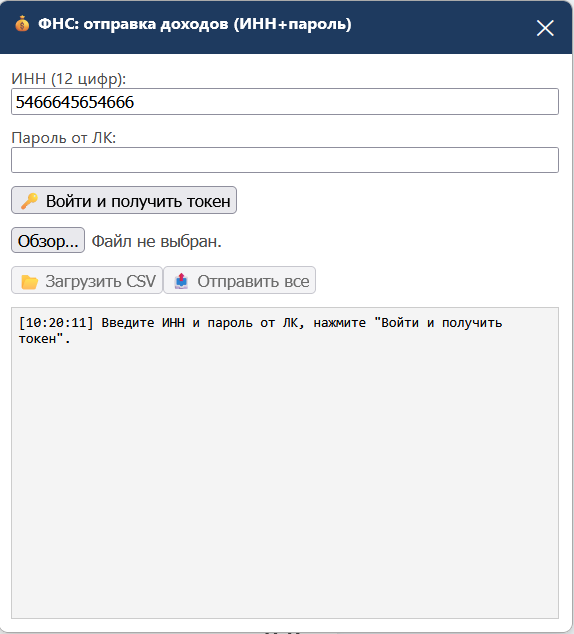
A script for automatically sending bulk income from Yukassa and other payment systems to My Tax (FTS). It works with CSV payment downloads. You can upload the CSV directly in your browser and send all payments with one click.
INSTRUCTIONS FOR USING THE FTS BOOKMARKET
After payment, you will receive a link to the file. The file contains the bookmarklet code (one line).
WHAT IS IT?
A bookmarklet is a small JS program that adds a window to any page for bulk income transfers to the FTS personal account (self-employed, professional income tax).
HOW TO INSTALL?
1. Open any browser (Chrome, Firefox, Edge, Opera, Safari)
2. Create a new bookmark (Ctrl+D / Cmd+D)
3. Right-click the bookmark → "Edit"
4. In the "Name" field, enter: FTS Income Transfer
5. In the "Address" (URL) field, paste the ENTIRE code from the received file (one line!)
6. Save the bookmark
HOW TO USE?
1. Go to any page (a blank tab will do)
2. Click the saved bookmark
3. In the window that appears, enter your Taxpayer Identification Number (TIN) and password for your Federal Tax Service account
4. Click "Log in and get a token"
5. Upload a CSV file with payments from your bank/service
6. Click "Submit all"
CSV FILE REQUIREMENTS:
- Separator: semicolon (;)
- Required columns: Payment Date, Payment Amount, Payment Status
- Status of paid payments: "Paid"
SUPPORTED BROWSERS:
- Google Chrome (recommended)
- Mozilla Firefox
- Microsoft Edge
- Opera
- Safari (macOS)
NOTE:
- The bookmarklet does not store your data—it is entered each time you use it.
- All requests go directly to the Federal Tax Service API.
- Active internet access is required.
INSTRUCTIONS FOR USING THE FTS BOOKMARKET
After payment, you will receive a link to the file. The file contains the bookmarklet code (one line).
WHAT IS IT?
A bookmarklet is a small JS program that adds a window to any page for bulk income transfers to the FTS personal account (self-employed, professional income tax).
HOW TO INSTALL?
1. Open any browser (Chrome, Firefox, Edge, Opera, Safari)
2. Create a new bookmark (Ctrl+D / Cmd+D)
3. Right-click the bookmark → "Edit"
4. In the "Name" field, enter: FTS Income Transfer
5. In the "Address" (URL) field, paste the ENTIRE code from the received file (one line!)
6. Save the bookmark
HOW TO USE?
1. Go to any page (a blank tab will do)
2. Click the saved bookmark
3. In the window that appears, enter your Taxpayer Identification Number (TIN) and password for your Federal Tax Service account
4. Click "Log in and get a token"
5. Upload a CSV file with payments from your bank/service
6. Click "Submit all"
CSV FILE REQUIREMENTS:
- Separator: semicolon (;)
- Required columns: Payment Date, Payment Amount, Payment Status
- Status of paid payments: "Paid"
SUPPORTED BROWSERS:
- Google Chrome (recommended)
- Mozilla Firefox
- Microsoft Edge
- Opera
- Safari (macOS)
NOTE:
- The bookmarklet does not store your data—it is entered each time you use it.
- All requests go directly to the Federal Tax Service API.
- Active internet access is required.
TECHNICAL FEATURES:
1. The bookmarklet does NOT collect or transfer your data to third parties.
2. All interactions occur ONLY with FTS servers.
3. The source code is completely open—you can inspect it.
No data is sent to the script author or to third-party servers.
1. The bookmarklet does NOT collect or transfer your data to third parties.
2. All interactions occur ONLY with FTS servers.
3. The source code is completely open—you can inspect it.
No data is sent to the script author or to third-party servers.
No feedback yet