Fsociety for PUBG (Steam, PC) — private cheat: ESP, Aimbot, Radar, Recoil Control
Content: text (0 symbol)
Available: 29
Uploaded: 07.06.2026
Positive responses: 0
Negative responses: 0
Sold: 1
Refunds: 0
Seller: Best-Sales
information about the seller and its items
Loyalty discount! If the total amount of your purchases from the seller more than:
| $10 | the discount is | 3% |
| $30 | the discount is | 4% |
| $50 | the discount is | 5% |
| $100 | the discount is | 10% |
| $150 | the discount is | 12% |
| $300 | the discount is | 15% |
| $800 | the discount is | 20% |
$7.59
🟢 Fsociety for PUBG (Steam, PC) — private cheat: ESP, Aimbot, Radar, Recoil Control
Fsociety is a modern private tool for PUBG (Steam / PC). Full-featured ESP with a
layout preview, precise aimbot with bone selection and an FOV circle, a standalone
recoil control system (RCS) with per-weapon sliders, a mini-radar and world markers
(airdrops, death crates, grenade warnings). Interface in English and Russian, flexible
profiles with auto-load and a hotkey for every action. No USB stick and no third-party
software required to run.
⚙️ COMPATIBILITY
• Game client: Steam
• CPU: Intel / AMD
• OS: Windows 10 (any build) and Windows 11 x64 — 24H2 / 25H2,
up to build 26200.8037 inclusive
• Window mode: Windowed / Borderless
• USB stick: not required
⚠️ Does not work on every system — check your Windows build carefully
(for Win 11 — up to .8037 inclusive).
👁 VISUALS / ESP
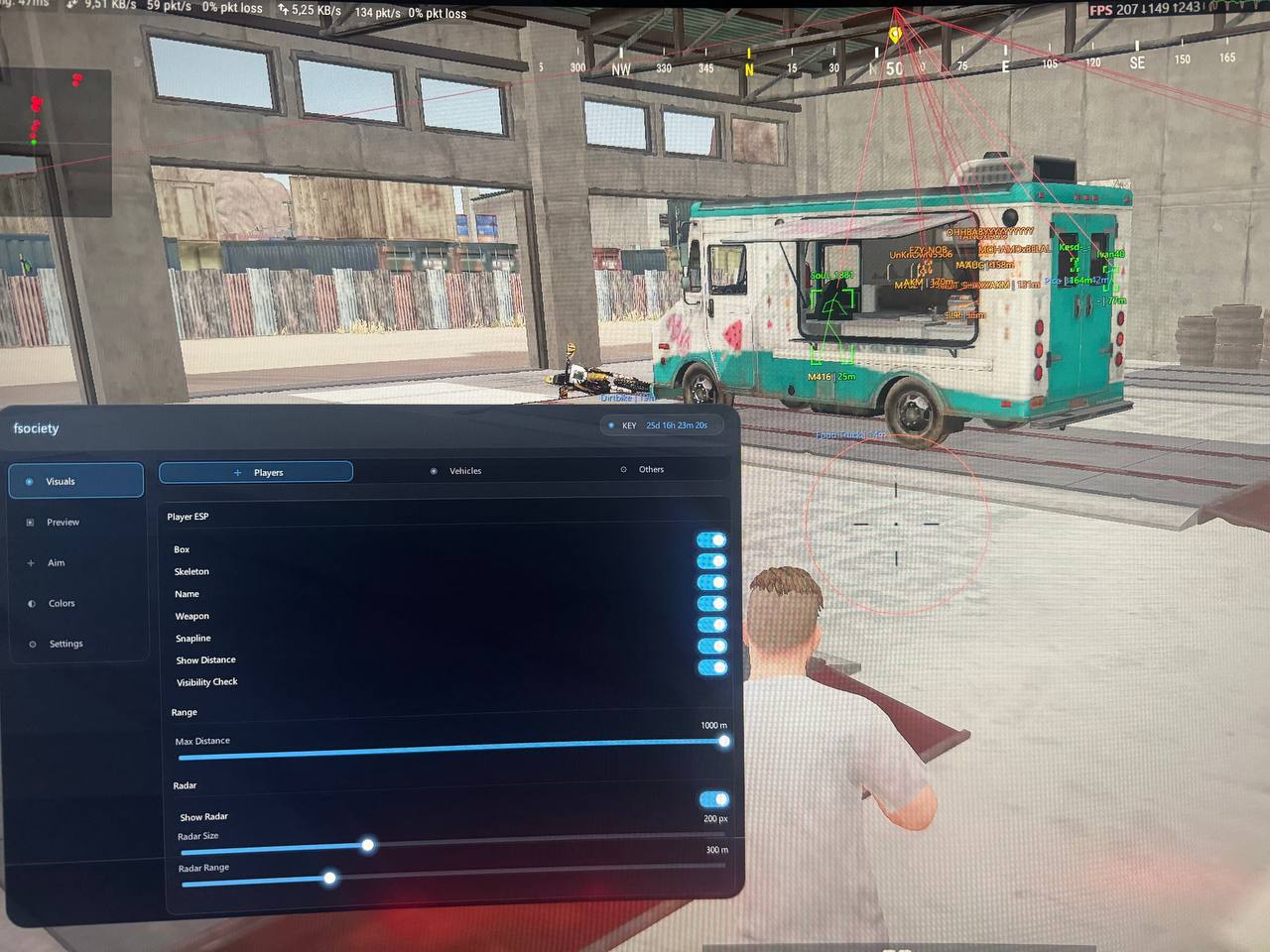
Players: Box • Skeleton • Name • Weapon (held weapon) • Snapline (line to target)
• Show Distance (meters) • Visibility Check (draw visible only) • Max Distance (render limit).
Radar: on-screen mini-radar, adjustable widget size and dot range.
Vehicles: Vehicle ESP + distance limit.
Others: Airdrop (+ color) • Death Crate (+ distance limit)
• Grenade Warning — Frag / Molotov / Smoke / Flashbang / Decoy.
🎯 AIM
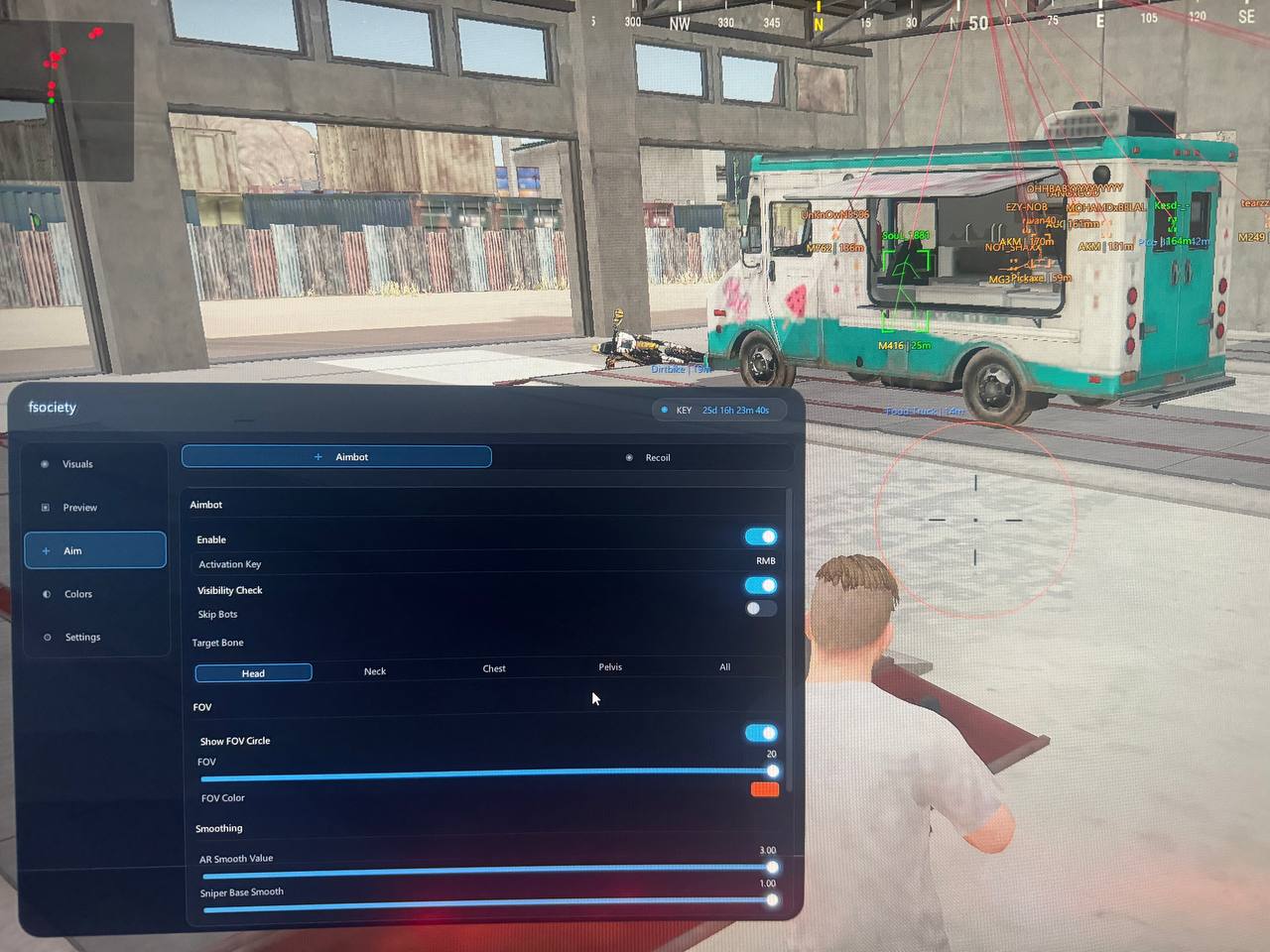
Aimbot: Enable • Activation Key (hold key) • Visibility Check (visible only)
• Skip Bots • Target Bone — Head / Neck / Chest / Pelvis / All
(All — auto-picks the bone nearest to the crosshair).
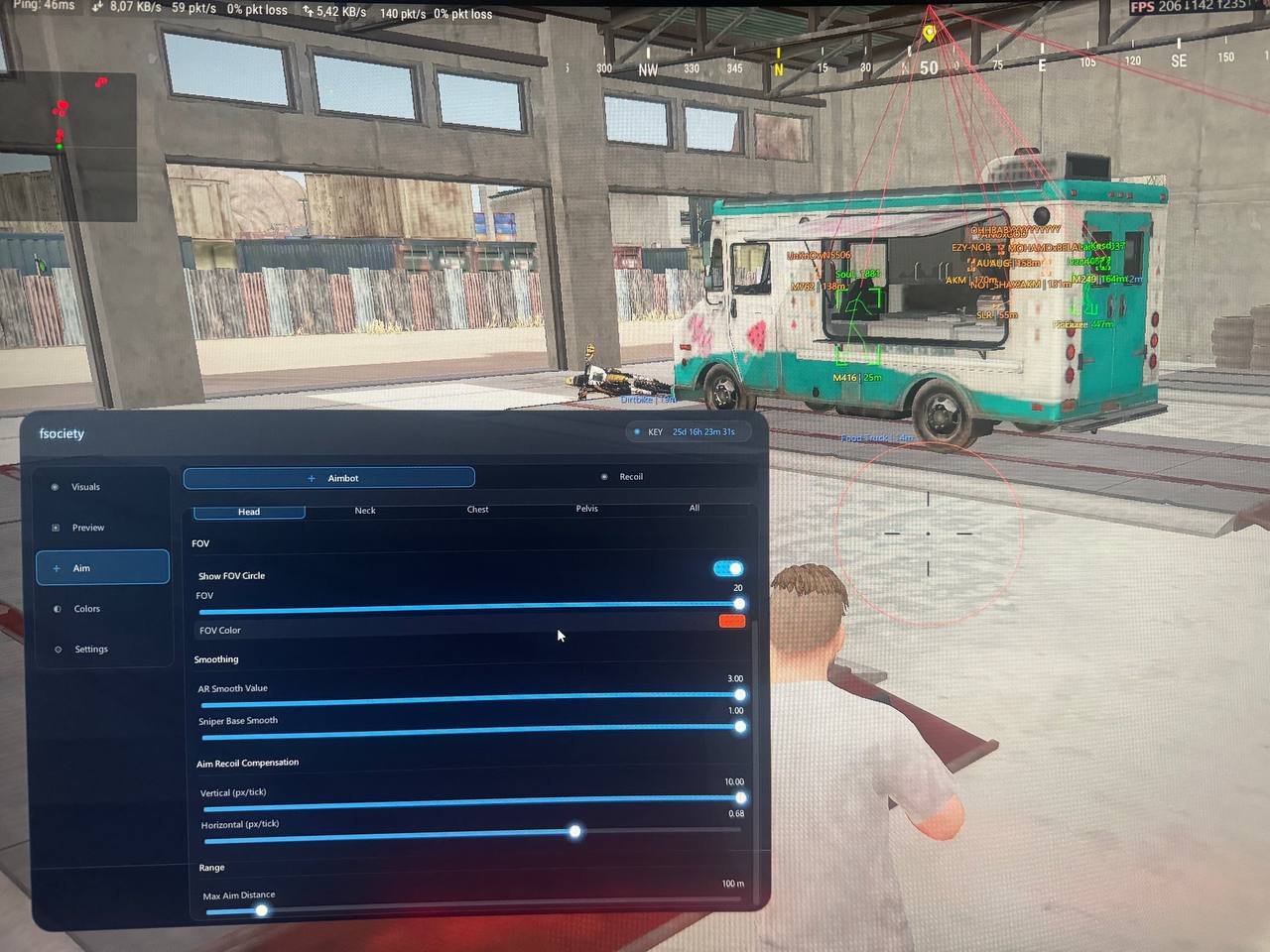
FOV: on-screen FOV circle, adjustable radius and color.
Smoothing: separate smoothing for AR/SMG and for snipers.
Aim Recoil Compensation: vertical and horizontal recoil compensation (px/tick).
Range: max lock distance.
🎛 RECOIL CONTROL (RCS)
Standalone RCS outside aim mode: Hold key, current-weapon indicator, and per-weapon
V/H sliders for every gun:
• Assault Rifles: AKM, SCAR-L, M416, AUG, Groza, QBZ, M762, G36C, FAMAS, ACE32,
Honey Badger, K2, M16A4, Mk47
• SMG: UZI, UMP45, Vector, Tommy Gun, Bizon, MP5K, P90, PP19, JS9, MP9
• DMR: SKS, VSS, Mini14, SLR, QBU, MK12, Mk14
• LMG: DP28, M249, MG3
• Auto Pistols: P18C
🧩 PREVIEW (ESP layout)
Player / Bot toggle, Visible / Behind Wall modes, drag-and-drop of elements
(Name / Weapon / Distance / Snapline) across snap zones, Reset Layout.
🎨 COLORS
Separate palettes for Visible and Behind Wall — independently for Players and Bots:
Name / Skeleton / Box / Weapon / Snapline, a dedicated color per state.
⚙️ SETTINGS
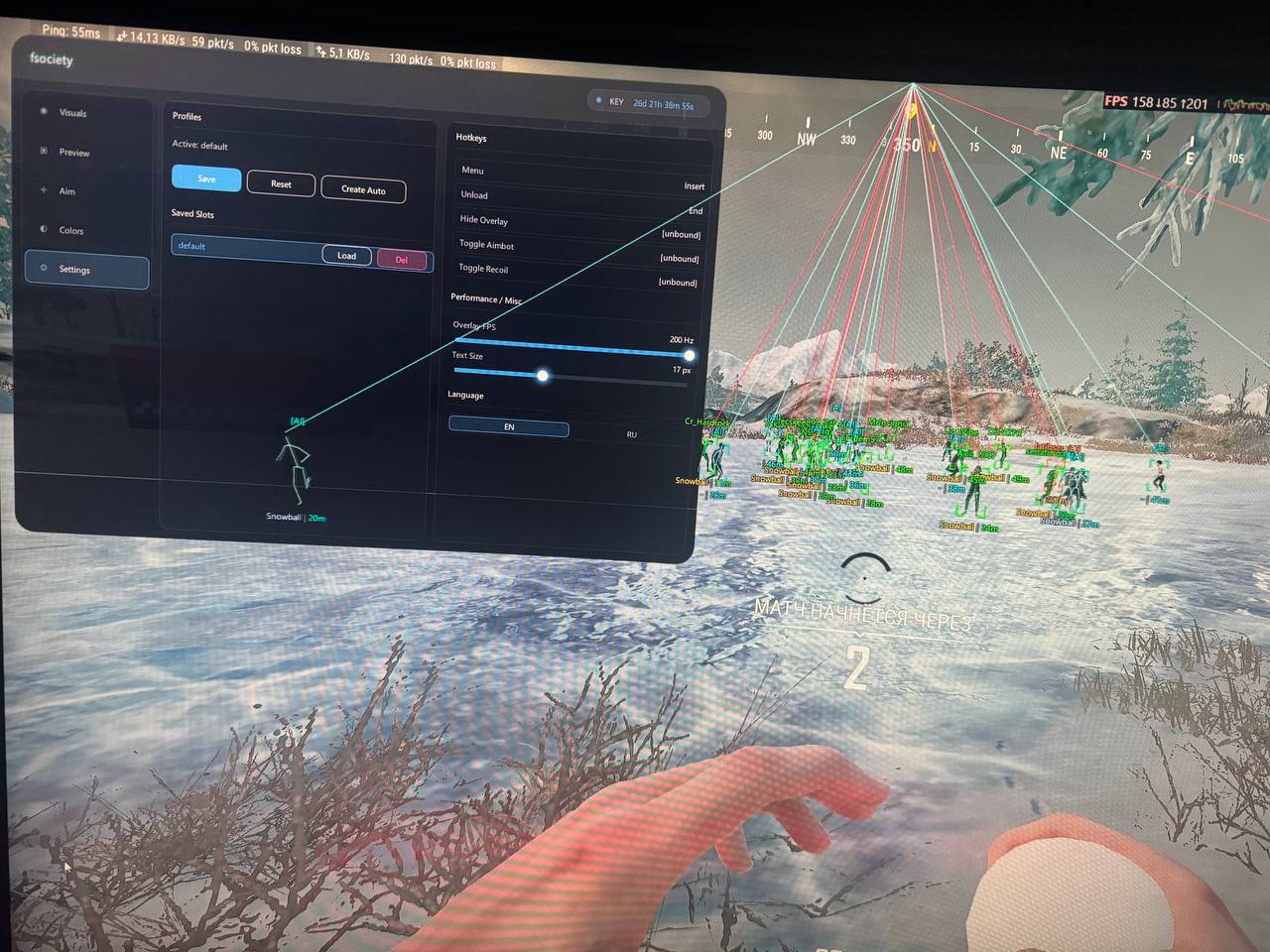
Profiles: Active Profile • Save / Reset / Create Auto • slots with Load / Delete.
Hotkeys: Menu (open/close) • Unload • Hide Overlay • Toggle Aimbot / Recoil.
Misc: overlay FPS limit, single ESP text size.
Interface language: EN / RU.
📋 INSTRUCTIONS
Prepare Windows (once):
1) Disable Windows Defender: Real-time protection, Tamper Protection, Cloud-delivered
protection, Automatic sample submission — all OFF.
2) Fully disable third-party antivirus (Kaspersky, Avast, ESET, Bitdefender, Norton,
etc.) while using the software.
3) Run the loader as administrator (Right-click → "Run as administrator", confirm UAC).
Launch (every time, strictly in order):
1) PUBG must be CLOSED.
2) Stop anti-cheat processes — in an admin cmd:
sc stop faceit
sc stop vgc
sc stop vgk
taskkill /F /IM FACEITClient.exe
taskkill /F /IM vgc.exe
taskkill /F /IM vgtray.exe
3) Run the loader → Load, wait for "Loaded successfully". Do NOT close the loader window.
4) Launch PUBG, press F5 in the game menu.
5) If ESP doesn´t render in a match — close the game and restart the software.
❗ COMMON ISSUES
• timestamp / bad_timestamp — your clock is out of sync with the server:
Start → "Date & time" → "Set time automatically" ON → "Sync now",
verify the time zone.
• session_invalid — the session expired or was opened on another device:
restart the app and re-enter your key.
🛡 WARRANTY & SUPPORT
Before purchase
Fsociety is a modern private tool for PUBG (Steam / PC). Full-featured ESP with a
layout preview, precise aimbot with bone selection and an FOV circle, a standalone
recoil control system (RCS) with per-weapon sliders, a mini-radar and world markers
(airdrops, death crates, grenade warnings). Interface in English and Russian, flexible
profiles with auto-load and a hotkey for every action. No USB stick and no third-party
software required to run.
⚙️ COMPATIBILITY
• Game client: Steam
• CPU: Intel / AMD
• OS: Windows 10 (any build) and Windows 11 x64 — 24H2 / 25H2,
up to build 26200.8037 inclusive
• Window mode: Windowed / Borderless
• USB stick: not required
⚠️ Does not work on every system — check your Windows build carefully
(for Win 11 — up to .8037 inclusive).
👁 VISUALS / ESP
Players: Box • Skeleton • Name • Weapon (held weapon) • Snapline (line to target)
• Show Distance (meters) • Visibility Check (draw visible only) • Max Distance (render limit).
Radar: on-screen mini-radar, adjustable widget size and dot range.
Vehicles: Vehicle ESP + distance limit.
Others: Airdrop (+ color) • Death Crate (+ distance limit)
• Grenade Warning — Frag / Molotov / Smoke / Flashbang / Decoy.
🎯 AIM
Aimbot: Enable • Activation Key (hold key) • Visibility Check (visible only)
• Skip Bots • Target Bone — Head / Neck / Chest / Pelvis / All
(All — auto-picks the bone nearest to the crosshair).
FOV: on-screen FOV circle, adjustable radius and color.
Smoothing: separate smoothing for AR/SMG and for snipers.
Aim Recoil Compensation: vertical and horizontal recoil compensation (px/tick).
Range: max lock distance.
🎛 RECOIL CONTROL (RCS)
Standalone RCS outside aim mode: Hold key, current-weapon indicator, and per-weapon
V/H sliders for every gun:
• Assault Rifles: AKM, SCAR-L, M416, AUG, Groza, QBZ, M762, G36C, FAMAS, ACE32,
Honey Badger, K2, M16A4, Mk47
• SMG: UZI, UMP45, Vector, Tommy Gun, Bizon, MP5K, P90, PP19, JS9, MP9
• DMR: SKS, VSS, Mini14, SLR, QBU, MK12, Mk14
• LMG: DP28, M249, MG3
• Auto Pistols: P18C
🧩 PREVIEW (ESP layout)
Player / Bot toggle, Visible / Behind Wall modes, drag-and-drop of elements
(Name / Weapon / Distance / Snapline) across snap zones, Reset Layout.
🎨 COLORS
Separate palettes for Visible and Behind Wall — independently for Players and Bots:
Name / Skeleton / Box / Weapon / Snapline, a dedicated color per state.
⚙️ SETTINGS
Profiles: Active Profile • Save / Reset / Create Auto • slots with Load / Delete.
Hotkeys: Menu (open/close) • Unload • Hide Overlay • Toggle Aimbot / Recoil.
Misc: overlay FPS limit, single ESP text size.
Interface language: EN / RU.
📋 INSTRUCTIONS
Prepare Windows (once):
1) Disable Windows Defender: Real-time protection, Tamper Protection, Cloud-delivered
protection, Automatic sample submission — all OFF.
2) Fully disable third-party antivirus (Kaspersky, Avast, ESET, Bitdefender, Norton,
etc.) while using the software.
3) Run the loader as administrator (Right-click → "Run as administrator", confirm UAC).
Launch (every time, strictly in order):
1) PUBG must be CLOSED.
2) Stop anti-cheat processes — in an admin cmd:
sc stop faceit
sc stop vgc
sc stop vgk
taskkill /F /IM FACEITClient.exe
taskkill /F /IM vgc.exe
taskkill /F /IM vgtray.exe
3) Run the loader → Load, wait for "Loaded successfully". Do NOT close the loader window.
4) Launch PUBG, press F5 in the game menu.
5) If ESP doesn´t render in a match — close the game and restart the software.
❗ COMMON ISSUES
• timestamp / bad_timestamp — your clock is out of sync with the server:
Start → "Date & time" → "Set time automatically" ON → "Sync now",
verify the time zone.
• session_invalid — the session expired or was opened on another device:
restart the app and re-enter your key.
🛡 WARRANTY & SUPPORT
Before purchase
After payment, you will receive detailed instructions that will include a link to download the cheat, a description of the launch, recommendations for use, and a key.
You will need to download the program, insert the key that will be sent to your email, select the cheat you bought and click "Activate".
Then follow the instructions.
You will need to download the program, insert the key that will be sent to your email, select the cheat you bought and click "Activate".
Then follow the instructions.
Please note that for the program to work properly, you must disable the security services. Otherwise, the software may not work.
No feedback yet